Drafting pocket doors in architectural CAD requires more than placing a sliding-door symbol in a partition. Because the leaf and operating assembly occupy a concealed wall cavity, the drawing must support coordination with framing, finishes, services, hardware, casework, and annotations.
This guide presents a practical workflow for creating readable pocket-door graphics while keeping the opening, travel direction, restricted wall zone, schedule data, and related views coordinated.
Pocket doors require more coordination than their compact plan symbol suggests. Unlike a conventional swing door, the leaf retracts into a wall cavity containing a frame, track, guides, stops, and related hardware. That concealed assembly can conflict with wall framing, electrical devices, plumbing, casework, and wall-mounted accessories.
A useful CAD representation must therefore do more than show that the door slides. It should communicate the opening, pocket direction, door type, and relevant coordination limits without turning the floor plan into a fabrication drawing. The following workflow explains how to represent pocket doors clearly across plans, elevations, sections, schedules, and detail references.
Understand the complete door assembly
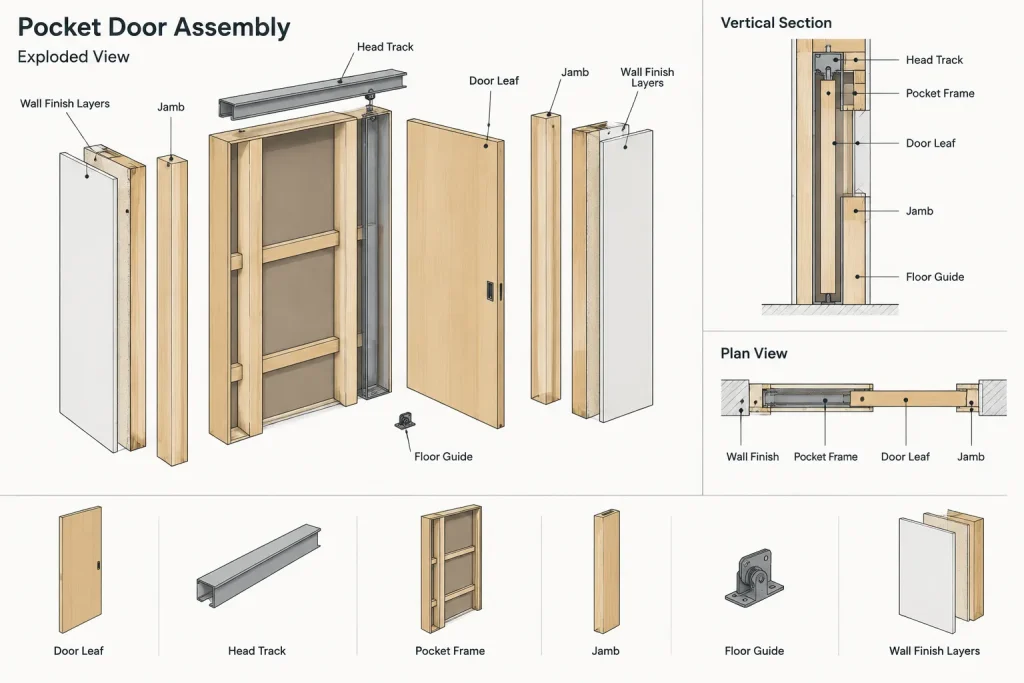
Begin by treating the pocket door as an assembly rather than an isolated door leaf. The coordinated condition may include:
- The door leaf and its actual thickness
- The clear opening and rough opening
- The concealed pocket frame or framing zone
- The head track and support
- Floor guides, stops, and soft-closing components where specified
- Jambs, split jambs, trim, or flush wall interfaces
- Pulls, locks, privacy hardware, and edge hardware
- Required access to removable or serviceable components
Not every component belongs on the general floor plan. However, the drafter should understand the full assembly before deciding what to show. Manufacturer information, project specifications, door details, and hardware requirements should be reviewed before relying on a generic CAD block.
Define the opening and pocket direction first
Establish the intended clear opening and confirm which side of the opening receives the door. The pocket direction affects nearby switches, receptacles, wall-mounted controls, plumbing lines, blocking, artwork, accessories, and casework.
A single sliding leaf normally requires a pocket on one side of the opening. A pair of pocket doors requires coordinated pockets on both sides unless the design uses another configuration. Do not mirror a symbol merely because it fits the room graphically. Confirm the operating intent, approach side, hardware location, and relationship to adjacent circulation.
Use fixed reference geometry for the wall opening and centerline before placing the door block. This makes it easier to compare the plan with dimensions, elevations, and the door schedule.
Draft the floor-plan symbol clearly
Show the leaf in a recognizable position
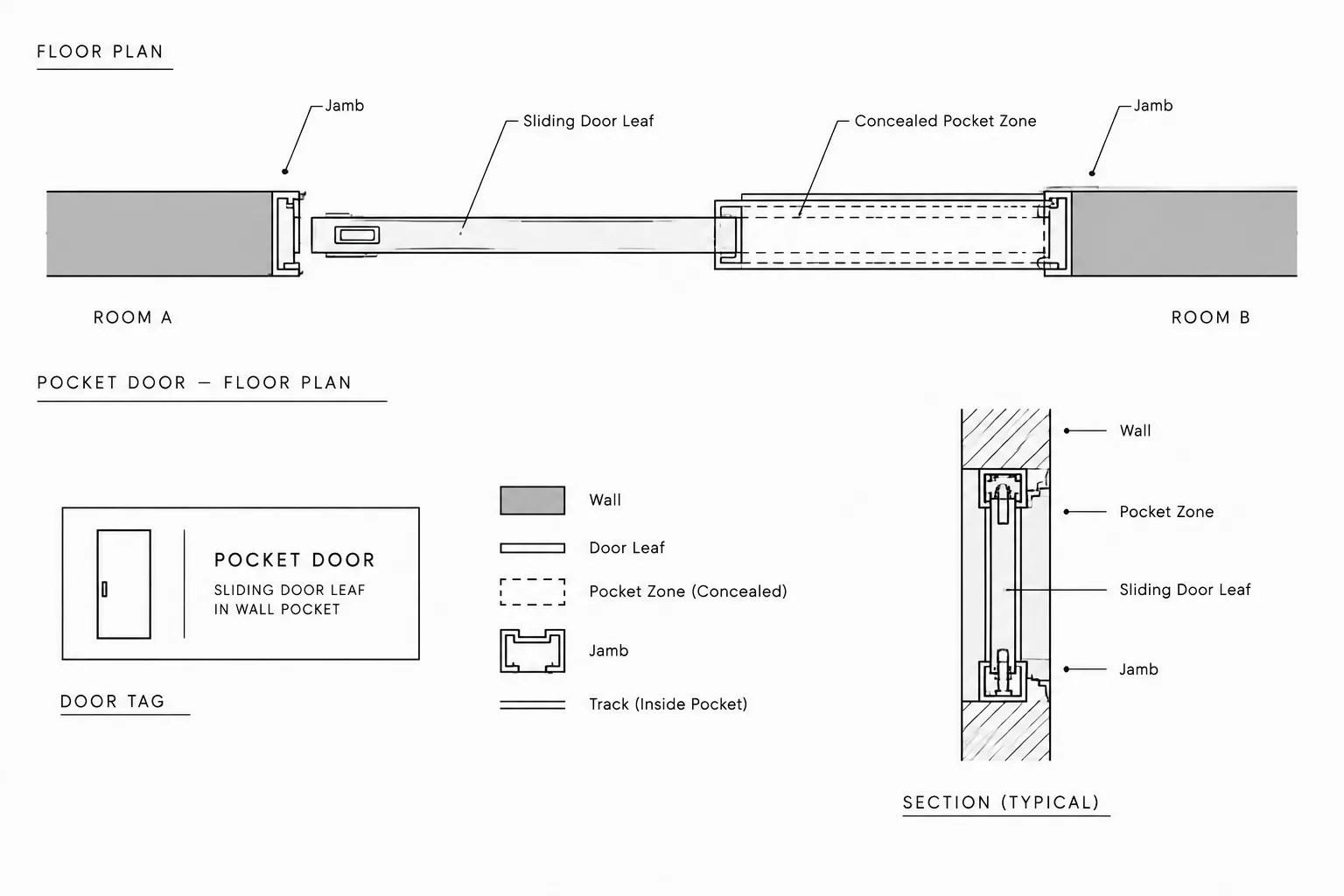
A common plan convention shows the leaf partly or fully retracted into the wall pocket. Another option is to show the leaf closed, with concealed portions distinguished from visible geometry. Whichever convention the project uses, apply it consistently throughout the drawing set.
The symbol should communicate:
- The location and width of the opening
- The direction in which the leaf travels
- The approximate extent of the concealed pocket
- The relationship between the leaf and finished wall faces
- The associated door tag
Avoid representing the pocket as an empty break in the wall. The wall still contains a framed assembly, even though it may not accept the same services or attachments as a conventional partition.
Distinguish visible and concealed geometry
Use the project’s established lineweight and linetype hierarchy. Visible jambs and cut wall edges generally need stronger graphics than the concealed leaf or pocket frame. Hidden components may be shown with a lighter or dashed line when they are important to plan coordination.
Do not add every internal frame member to a general plan. Dense hidden geometry can make the door unreadable at the intended plot scale. Reserve assembly-level information for enlarged plans, wall sections, or dedicated details.
Keep the wall graphics continuous and controlled
Trim wall components only where required for the actual opening. If walls use separate finish, substrate, and poche geometry, coordinate each component rather than cutting a single rectangular gap through all linework. At the pocket, wall thickness or construction may differ from the adjacent partition, so the plan should not imply an assembly that cannot contain the specified frame.
Reserve the pocket as a coordination zone
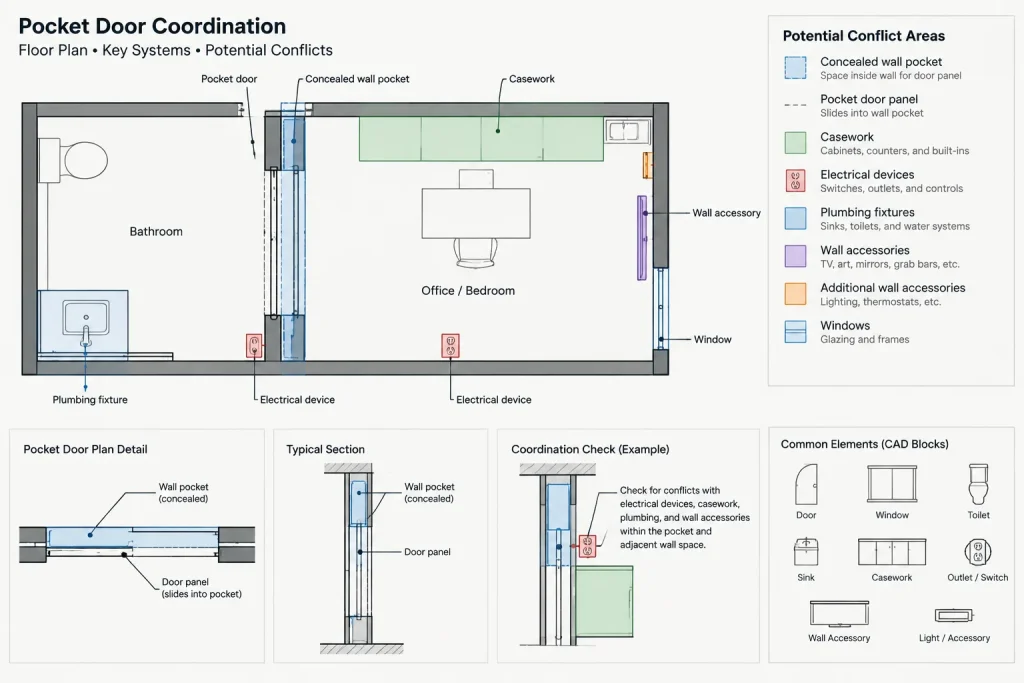
The pocket area should be treated as a restricted wall zone. Services and attachments placed there can obstruct the moving leaf or penetrate the frame. Depending on the selected assembly, conflicts may include electrical boxes, plumbing, recessed equipment, wall anchors, grab bars, handrails, millwork fasteners, and structural bracing.
For coordination drawings, consider using nonplot construction geometry or a dedicated coordination layer to outline the pocket extent. This zone can be visible during drafting and review without appearing on the final sheet. If another discipline receives the architectural background, provide enough stable geometry for the pocket location to remain identifiable.
Do not assume that a shallow device or short fastener is acceptable. Verify penetrations and mounting methods against the selected door assembly and project requirements.
Coordinate elevations and sections
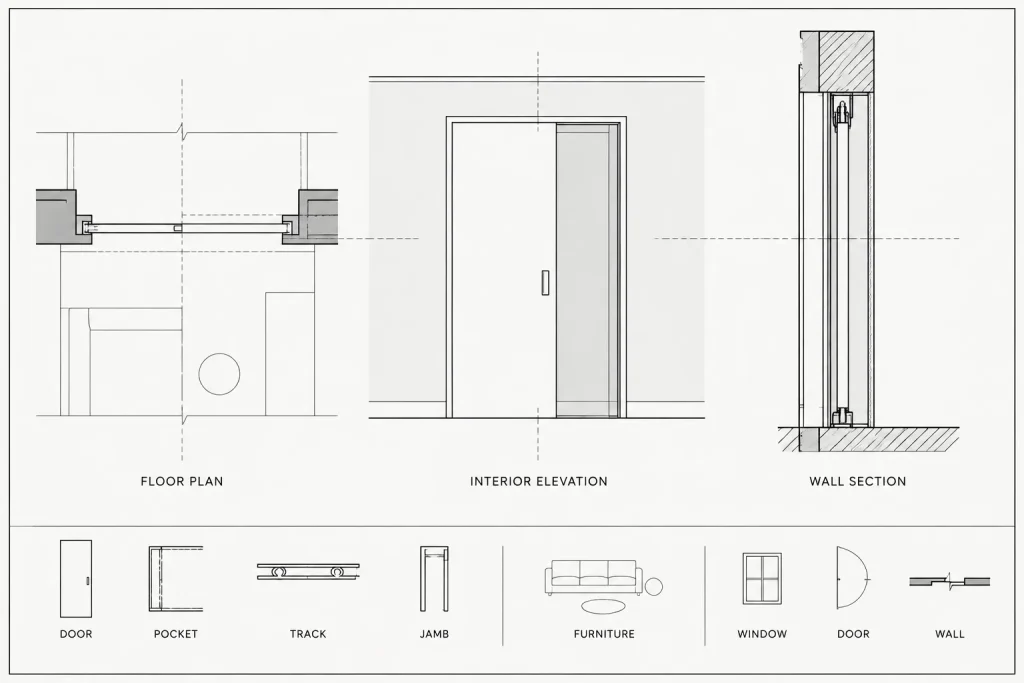
An interior elevation can clarify jamb treatment, trim, head height, adjacent finishes, and hardware. Show the door in a position that best explains the design, and label the view if the operating position could be misunderstood.
A section or enlarged detail may be needed where the pocket interfaces with:
- A ceiling transition or bulkhead
- A rated or acoustically sensitive partition
- Tile, paneling, or another thick finish
- Built-in casework
- A frameless or concealed-jamb appearance
- A floor transition or track condition
Align the plan opening, elevation jambs, and section geometry from common references. Avoid redrawing each view independently without checks. Independent drafting often produces small but consequential differences in opening location, wall thickness, trim, or head condition.
Build a reusable CAD block without hiding project decisions
A pocket-door block can improve consistency, but it should remain easy to inspect and edit. Useful components include a leaf outline, pocket indicator, opening reference, insertion point, and optional tag location. Separate visible and concealed geometry by layer or another controlled property so the symbol follows the drawing’s graphic system.
Choose an insertion point tied to a stable architectural reference, such as a jamb or opening centerline. Avoid insertion points on an arbitrary corner of the symbol. If the block supports multiple orientations, verify that flipping or mirroring does not reverse text, move the tag incorrectly, or place hardware on the wrong side.
Generic library blocks are starting points only. Confirm the block against the selected wall assembly and door information before using it for documentation.
Coordinate the door tag, schedule, and hardware information
Tag the pocket door using the same identification system as other doors. The schedule should distinguish it from a hinged or surface-sliding door through the project’s type, operation, frame, or remarks fields. Avoid relying on the plan symbol alone to communicate the door operation.
Review the relationship among the plan, door schedule, frame information, elevations, details, and hardware documentation. A pocket door may require edge pulls, flush pulls, privacy hardware, locks, or special operating components. Hardware also affects whether the leaf can be fully retrieved from the pocket and how the door is operated from each side.
Accessibility, egress, fire-resistance, acoustical performance, and hardware requirements depend on the project and jurisdiction. These conditions must be verified by the responsible design team rather than inferred from a generic CAD detail.
Common pocket-door drafting problems
| Problem | Likely cause | Practical CAD check |
|---|---|---|
| The door appears to slide into a normal stud wall | The pocket assembly was treated as a simple symbol | Compare the wall construction and pocket frame requirements |
| Devices overlap the pocket | The concealed zone is not visible during coordination | Display the pocket coordination layer and review attached backgrounds |
| Plan and elevation disagree | Views were drafted from separate assumptions | Align jambs, opening centerlines, and head references |
| The door tag identifies the wrong operation | The block changed without a schedule update | Cross-check every tagged door against the schedule |
| A mirrored door has reversed hardware | Geometry was mirrored without a handing review | Inspect pulls, locks, text, and travel direction after editing |
| The pocket disappears on printed sheets | Hidden geometry is too light or assigned incorrectly | Test the drawing at its intended sheet scale and plot style |
Pocket-door CAD review checklist
- Confirm the opening location and door travel direction.
- Verify that the wall assembly can accommodate the selected pocket system.
- Check the pocket for electrical, plumbing, structural, and mounting conflicts.
- Compare the leaf, jambs, and head condition across plans, elevations, and sections.
- Confirm that the door tag matches the schedule and hardware information.
- Review adjacent casework, fixtures, controls, and wall-mounted accessories.
- Test block flips and mirrored conditions for incorrect handing or reversed text.
- Plot the relevant sheet to confirm that visible and concealed lines remain legible.
- Verify project-specific code, accessibility, rating, and manufacturer requirements.
Use the symbol as a coordination tool
A well-drafted pocket door is not merely a sliding rectangle inside a wall. Its CAD representation should identify the opening, make the travel direction obvious, preserve the concealed pocket as a coordination zone, and connect reliably with schedules and details. Keeping general-plan graphics simple while reserving assembly information for enlarged views produces drawings that are both readable and technically useful.
A practical review sequence for pocket-door drawings
Review pocket doors in stages rather than treating the symbol as a finished item as soon as it is inserted. Begin with architectural intent: confirm the opening, travel direction, wall relationship, and connection to adjacent circulation. Then review the concealed pocket against backgrounds and nearby elements that may compete for the same wall space.
Next, compare every representation of the door. The plan, elevation, section, schedule, hardware information, and detail references should describe the same operation and opening condition. Where information differs, resolve the underlying design decision instead of adjusting only the most visible view.
Finish with a plotted-sheet review. A symbol that appears clear while zoomed in may become ambiguous at the intended presentation scale. Check that the opening remains legible, the concealed geometry does not dominate the wall graphics, and the tag can be associated with the correct door.
Information to retain during drawing exchange
When architectural backgrounds are issued for coordination, the pocket location should remain understandable even if decorative annotation or nonessential detail is removed. Stable wall openings, recognizable door geometry, consistent tags, and controlled coordination layers help other disciplines identify the restricted zone.
Before an issue or handoff, confirm that temporary drafting lines are either intentionally retained as nonplot coordination geometry or removed. Avoid leaving duplicate leaf outlines, abandoned blocks, or conflicting pocket indicators that could be mistaken for active design information.
When a generic symbol is not enough
A simple plan symbol may be adequate for early layout work, but unusual finish transitions, concealed jambs, integrated casework, sensitive partition performance, or complex head conditions may require enlarged views and project-specific details. The purpose of added detail is not to reproduce an entire manufactured assembly. It is to explain the interfaces that affect architectural coordination and construction documentation.
Frequently asked questions
How should a pocket door appear on a floor plan?
The plan should make the wall opening, leaf travel direction, pocket location, and door tag understandable. Visible and concealed components should follow the project’s established lineweight and linetype hierarchy.
Should the pocket frame be shown on the general plan?
Show only the concealed geometry needed to explain or coordinate the condition. Detailed frame components are usually clearer in an enlarged plan, section, or dedicated detail than in a general floor plan.
Why should the pocket be treated as a restricted wall zone?
The cavity contains the moving leaf and related assembly components. Devices, pipes, anchors, blocking, recessed items, and attachments within that zone may interfere with operation or installation.
Can a standard sliding-door CAD block be used for a pocket door?
A generic block can provide starting geometry, but it should not be accepted without review. Confirm the opening reference, pocket direction, wall relationship, hardware orientation, tag position, and compatibility with the selected assembly.
What should be checked after mirroring a pocket-door block?
Review the travel direction, pulls, locks, text, tag location, jamb references, and nearby coordination zone. Mirroring geometry does not automatically confirm that the resulting door operation is correct.
How are pocket doors coordinated with electrical and plumbing drawings?
Keep the concealed pocket identifiable on coordination backgrounds and compare it with device, piping, equipment, and mounting locations. Potential penetrations should be verified against the selected assembly and project requirements.
When does a pocket door need an elevation or section?
Additional views are useful when the plan cannot clearly explain jambs, trim, finishes, head conditions, floor transitions, adjacent casework, or other assembly interfaces.