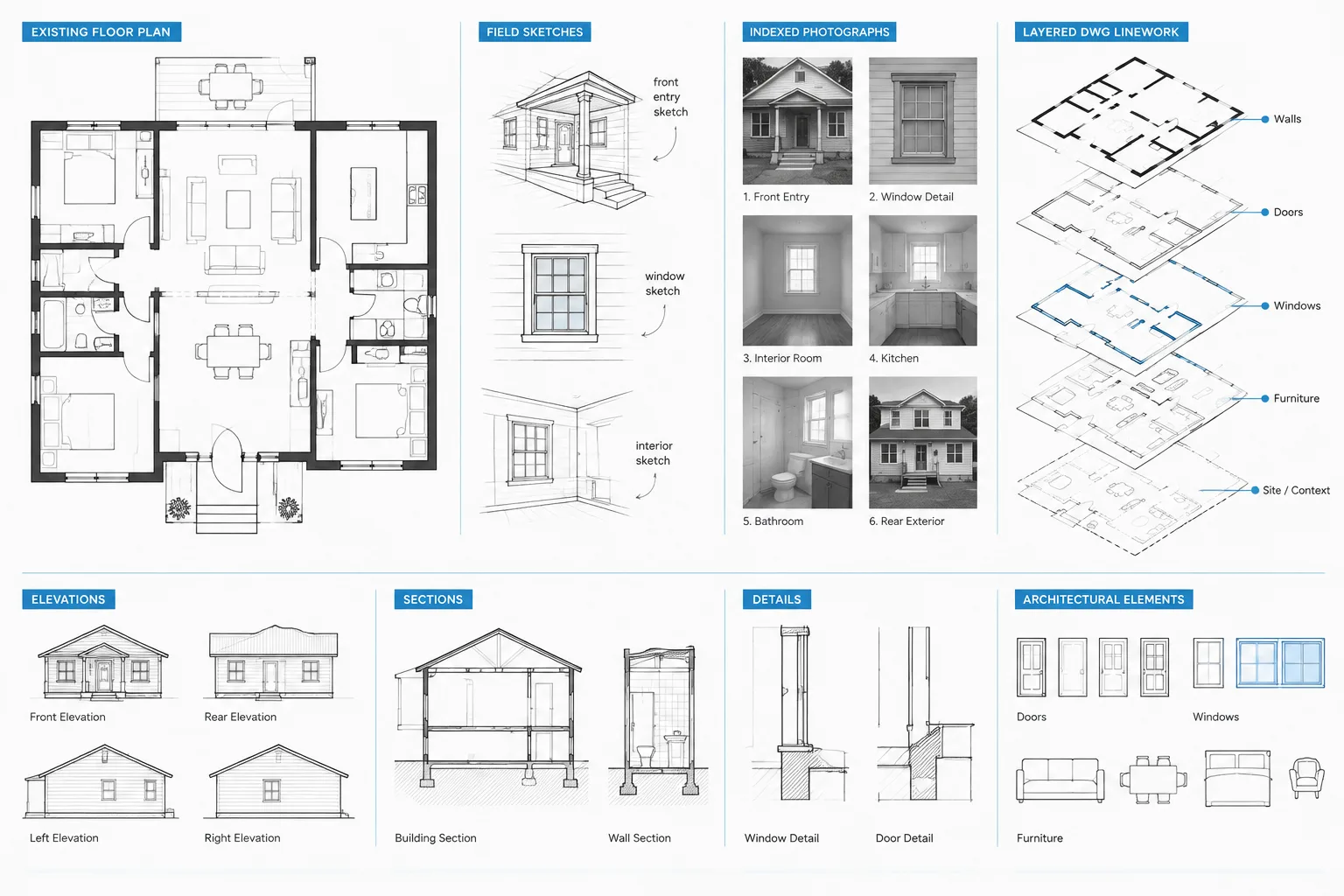
Creating existing conditions drawings in CAD is an evidence-management task as much as a drafting task. Measurements, photographs, legacy documents, visible construction, and inaccessible areas do not all carry the same level of confidence. A useful DWG preserves those distinctions while giving the project team a coordinated base for renovation planning.
The workflow below explains how to move from field investigation to organized CAD geometry without overstating accuracy. It also addresses source control, measurement closure, vertical coordination, unresolved conditions, and the review trail needed when the base drawing changes.
Existing conditions drawings often become the foundation for renovation, tenant improvement, and adaptive reuse work. If the base drawing is inaccurate, unclear, or treated as more precise than the field information supports, those problems can spread into demolition plans, proposed layouts, consultant backgrounds, and construction details.
A dependable workflow does more than transfer measurements into a DWG file. It preserves the relationship between field notes, photographs, source documents, measured geometry, and unresolved conditions. The goal is not to make an old building appear perfectly regular. It is to create a useful record that distinguishes confirmed information from assumptions and identifies what still needs verification.
Define the purpose and limits of the drawing
Before measuring or drafting, establish what the existing conditions drawings must support. A furniture test fit may require different information than a wall-removal study, ceiling renovation, accessibility review, or exterior alteration. The scope determines which spaces, surfaces, openings, equipment, and vertical relationships need attention.
Record the limits of the field investigation. Note whether concealed construction, locked rooms, high areas, occupied spaces, or hazardous locations were inaccessible. An architectural field measure should also not be presented as a property or boundary survey. Site boundaries, easements, and legal locations require appropriate source information and professional verification.
Collect and rank the available source material
Existing drawings can be useful, but they should not automatically be treated as an accurate record of current construction. Buildings change through additions, repairs, tenant work, equipment replacement, and undocumented modifications.
Common sources include:
- Original design or permit drawings
- Later renovation documents
- Facilities plans and maintenance diagrams
- Field sketches and measured dimensions
- Photographs and video
- Survey, scan, or point-cloud data prepared for the project
- Visible building elements and control points observed on site
Keep source files separate from the working architectural geometry. Attach reference drawings when helpful, but do not trace them blindly. Give field-confirmed information greater confidence than unverified legacy linework, while recognizing that even field measurements can contain mistakes.
Prepare a structured field-measure plan
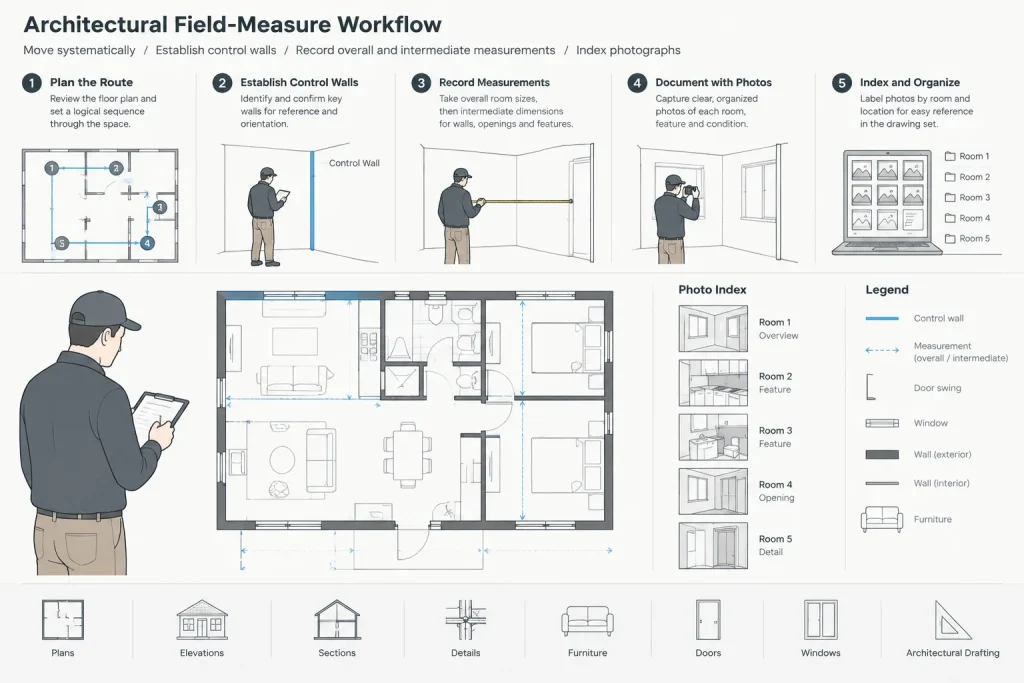
A systematic route through the building reduces gaps and duplicated effort. Organize the visit by floor, room, exterior face, or another sequence that matches the drawing set. Assign stable room identifiers before recording measurements so that sketches and photographs can be matched later.
Establish control geometry
Begin with major, recognizable elements such as exterior walls, structural grids, long corridors, stair enclosures, or other continuous features. These create a framework into which smaller rooms and openings can be fitted.
Use overall and intermediate measurements where access permits. A series of isolated room dimensions may appear complete but can accumulate error across a floor plan. Overall checks help reveal whether partitions, wall thicknesses, or offsets have been misunderstood.
Capture more than wall lengths
Depending on project scope, useful observations may include:
- Wall faces, thickness indications, jogs, and changes in construction
- Door and window locations, operation, sill conditions, and head relationships
- Columns, pilasters, shafts, stairs, and major level changes
- Ceiling changes, soffits, exposed structure, and visible services
- Plumbing fixtures, casework, equipment, and built-in features
- Floor transitions and changes in finish or elevation
- Exterior openings, grade relationships, and attached site elements
Do not infer concealed construction unless the project team has a reliable basis for doing so. A clean CAD wall assembly can unintentionally imply knowledge that was never obtained in the field.
Use photographs as indexed drawing evidence
Photographs are most valuable when they can be connected to a location. Use a consistent naming or logging method based on floor, room, view direction, or sketch reference. Capture both context views and close views of unusual conditions.
Photographs should supplement measurements rather than replace them. Perspective distortion can make objects look misaligned or change their apparent proportions. They are especially useful for confirming door handing, trim conditions, ceiling obstructions, equipment locations, and details that are difficult to describe in a field notebook.
Build the CAD base from large geometry to small geometry
Start the DWG with verified project units, a deliberate origin, and an agreed orientation. If consultant or survey coordinates are part of the project, preserve the coordination strategy rather than moving geometry casually to a convenient location.
Draft the largest confirmed boundaries first. Then add primary interior divisions, circulation zones, openings, and smaller features. This order makes it easier to compare cumulative dimensions and identify conflicts before the file becomes crowded.
Avoid forcing imperfect construction into perfect geometry
Existing buildings may have walls that are out of square, faces that are not parallel, irregular thicknesses, or repeated elements that vary. Do not automatically straighten or equalize them merely because the result looks cleaner.
At the same time, measurement noise should not be modeled as meaningful irregularity. Use overall checks, diagonals, repeated observations, and professional judgment to determine whether a variation represents the building or an imprecise measurement. When the distinction cannot be resolved, flag the condition instead of disguising it.
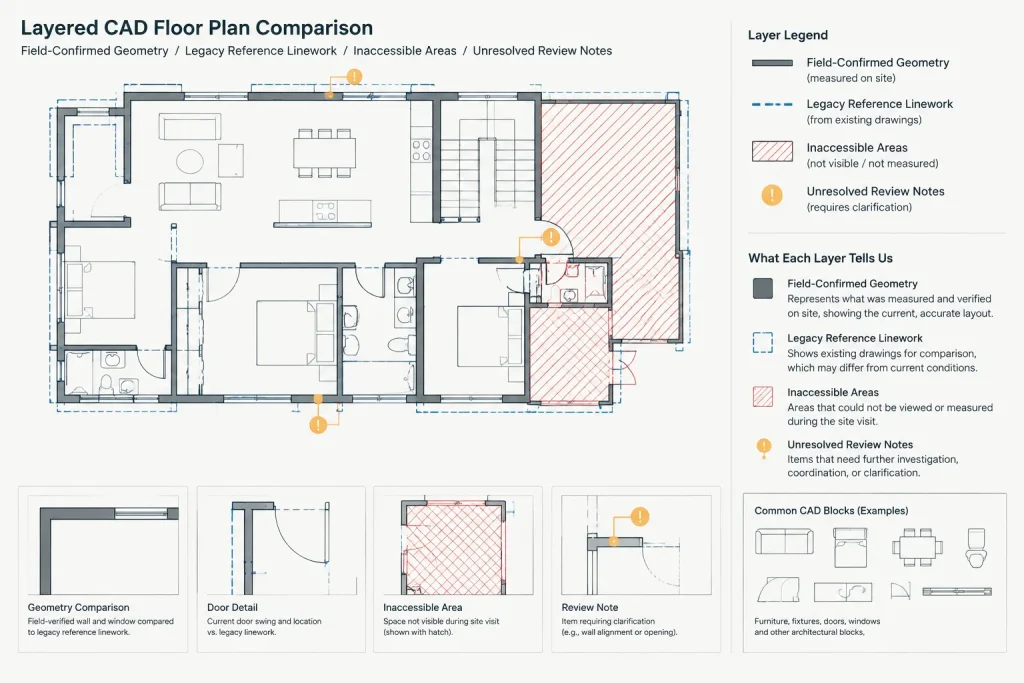
Separate confirmed, referenced, and uncertain information
Layer organization can communicate the status of existing information without creating multiple disconnected drawings. The exact layer names should follow the project standard, but the underlying categories should remain understandable.
| Information category | Recommended treatment | Coordination purpose |
|---|---|---|
| Field-confirmed geometry | Draft as controlled existing-condition linework | Provides the primary renovation base |
| Legacy drawing information | Keep identifiable as referenced or unverified | Prevents old records from appearing field confirmed |
| Inaccessible or concealed condition | Use a clear note, boundary, or status marker | Shows where additional investigation is needed |
| Temporary field annotation | Place on dedicated non-plot or review layers | Keeps questions visible during development |
| Items outside the measured scope | Show only when needed and label their source | Avoids implying comprehensive documentation |
Do not rely on color alone to communicate confidence. Color can change through plotting, layer overrides, or exported formats. Combine layer control with notes, symbols, or a documented graphic convention.
Represent walls and openings carefully
A common field-to-CAD error is measuring spaces without determining which wall faces were used. Dimensions taken from finish face to finish face should not be converted casually into assumed structural locations. Establish a consistent face-of-wall convention and document any exceptions.
Door and window blocks should match the observed operation and approximate configuration, but a generic block should not imply a verified manufacturer, frame profile, hardware set, or performance rating. Where detailed information matters, create an opening identifier and coordinate it with field notes, photographs, elevations, or schedules.
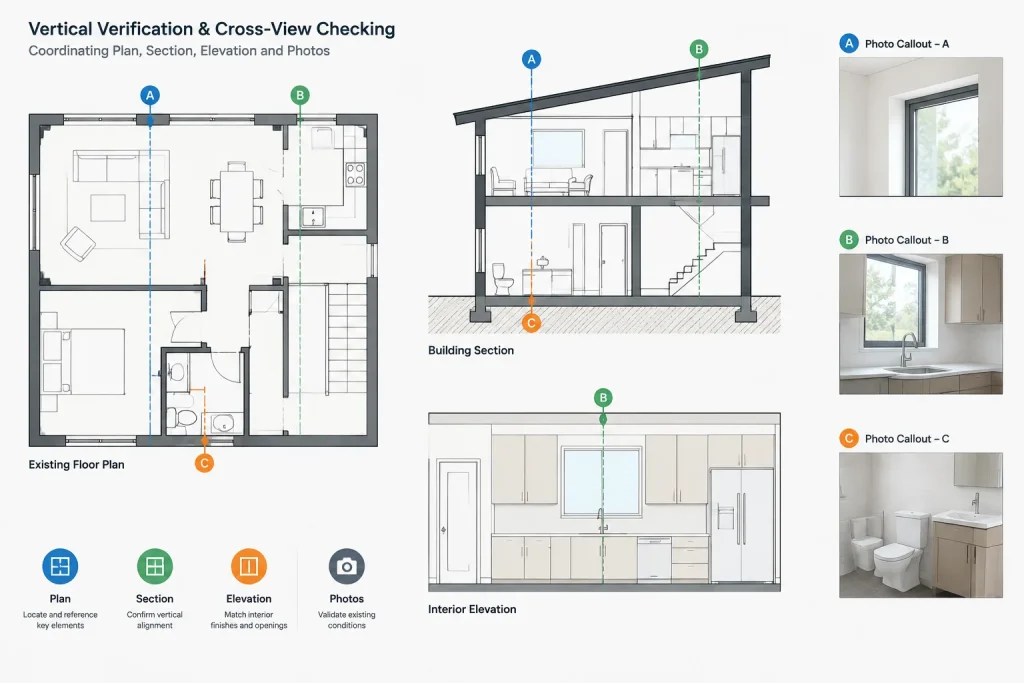
Coordinate vertical information
A floor plan alone may not reveal stepped slabs, sloped floors, ceiling transitions, window-head variation, or offsets between floors. Record a consistent vertical datum and relate spot observations to it. If reliable elevation control is unavailable, state the limitation rather than combining unrelated measurements as though they share a precise datum.
Use sections and interior elevations where vertical conditions influence the proposed design. These views can expose conflicts that are easy to miss in plan, including low beams, sloped ceilings, high openings, deep soffits, and changes in floor level.
Run closure and consistency checks
Quality control should occur while the field information is still fresh. Compare overall dimensions with the sum of intermediate dimensions, test diagonals where room shape matters, and check repeated bays or openings for unexpected variation.
Useful CAD review methods include measuring between known points, temporarily overlaying source drawings, isolating geometry by status, and checking whether polylines close where areas will be calculated. Review suspiciously clean alignments as carefully as obvious gaps; perfect repetition can be a sign that geometry was copied rather than verified.
Also compare plans against photographs, sections, elevations, and adjacent floors. Shafts, stairs, structural elements, and exterior openings should maintain a plausible relationship between views. Any discrepancy should become a tracked question rather than an undocumented drafting adjustment.
Preserve an audit trail
Keep dated field notes, photo logs, imported references, and review markups in a controlled project location. In the DWG, avoid deleting every trace of an unresolved issue simply to make the file appear finished. Move temporary notes to review layers or maintain a separate issue log so the team knows what remains open.
When the base drawing changes after another site visit, identify the revised area and notify disciplines using the file. Existing conditions backgrounds can affect demolition, structure, mechanical routing, electrical layouts, and cost planning, so silent changes create coordination risk.
Issue the drawing with appropriate qualifications
Before sharing the DWG, remove abandoned construction lines, verify layer states, confirm units and reference paths, and inspect the intended plot output. Include a concise description of the information sources and the scope of field verification. Identify areas that were inaccessible, based on records, or subject to further investigation.
An existing conditions drawing is a managed interpretation of available evidence, not a guarantee that every concealed or inaccessible condition has been discovered. A strong field-to-DWG workflow makes that distinction visible while still providing a clear, coordinated base for design.
Practical handoff considerations
A field-to-DWG workflow is complete only when another team member can understand both the geometry and its basis. Before issuing the file, review it from the perspective of someone who did not attend the site visit.
- Make the drawing status clear: Identify whether the file is a working survey base, a review background, or an issued existing conditions drawing.
- Retain source relationships: Keep field sketches, photographs, record drawings, scan references, and issue notes organized so unusual geometry can be traced back to its evidence.
- Expose unresolved questions: Use consistent notes or status graphics for concealed, inaccessible, conflicting, or unverified conditions.
- Check drawing dependencies: Review plans alongside sections, elevations, reflected ceiling information, and consultant backgrounds where those views share existing geometry.
- Communicate revisions: When later verification changes the base, identify the affected area and alert the people relying on the DWG.
Use confidence as a drafting decision
Not every observed condition deserves the same graphic certainty. A directly measured wall face may support controlled linework, while a partition inferred from an old plan may require a qualification. An opening visible in a photograph but not measured may be relevant without being precisely located. Treating these cases differently makes the drawing more informative, not less complete.
The central drafting question is therefore not simply whether an element should appear. It is whether the element is necessary for the intended use, what evidence supports it, and how its confidence should be communicated. That approach helps prevent clean CAD graphics from implying knowledge that the field investigation did not establish.
Frequently asked questions
What is an existing conditions drawing?
It is a drawing that records visible, measured, referenced, and otherwise documented features of a building or site for a defined project purpose. Its scope and qualifications should make clear which information was field confirmed and which information came from other sources.
Should legacy drawings be traced directly into the DWG?
Legacy drawings can provide useful context, but they should be compared with current field evidence. Keep their geometry identifiable as referenced or unverified until important conditions have been confirmed.
How should inaccessible areas be shown?
Use a consistent note, boundary, symbol, or status convention that remains understandable when plotted or exported. The drawing should not imply that an inaccessible area was fully measured.
Should crooked or irregular walls be straightened in CAD?
Do not automatically regularize geometry merely to create a cleaner plan. First determine whether the variation reflects actual construction or measurement uncertainty. If the evidence is inconclusive, flag the condition for review.
Why are overall measurements important?
Overall measurements help test whether smaller dimensions fit together and can reveal accumulated errors, misunderstood wall faces, or missing offsets. They provide a useful check against a plan assembled only from isolated room measurements.
When are sections or interior elevations needed?
They are useful when floor levels, ceilings, beams, soffits, openings, stairs, or other vertical relationships affect the proposed work. Plan geometry alone may not communicate those conditions adequately.
Can an existing conditions DWG be treated as a complete record of concealed construction?
No. Unless concealed work has been investigated and documented through an appropriate process, the drawing should not imply certainty about it. Qualifications and unresolved-condition notes are essential parts of the record.