Architectural keynotes in CAD connect compact drawing markers to coordinated instructions. Their value depends on more than symbol appearance: identifiers, note text, leaders, layers, drawing references, and revision practices must work together.
This guide explains how to establish a maintainable keynote workflow, reduce annotation conflicts, and review references across plans, elevations, sections, details, and plotted sheets.
Architectural keynotes replace repeated drawing text with compact identifiers that refer to a coordinated note list. Used carefully, they can reduce visual clutter and make recurring instructions easier to manage. Used inconsistently, they create missing references, duplicate notes, and uncertainty about which note applies to which object.
A reliable keynote workflow is not simply a matter of placing numbered bubbles. It requires a clear note structure, controlled identifiers, readable leaders, defined ownership, and a review process that checks both the symbol and its referenced text. The following workflow applies to floor plans, reflected ceiling plans, elevations, sections, and architectural details prepared in CAD.
What an architectural keynote communicates
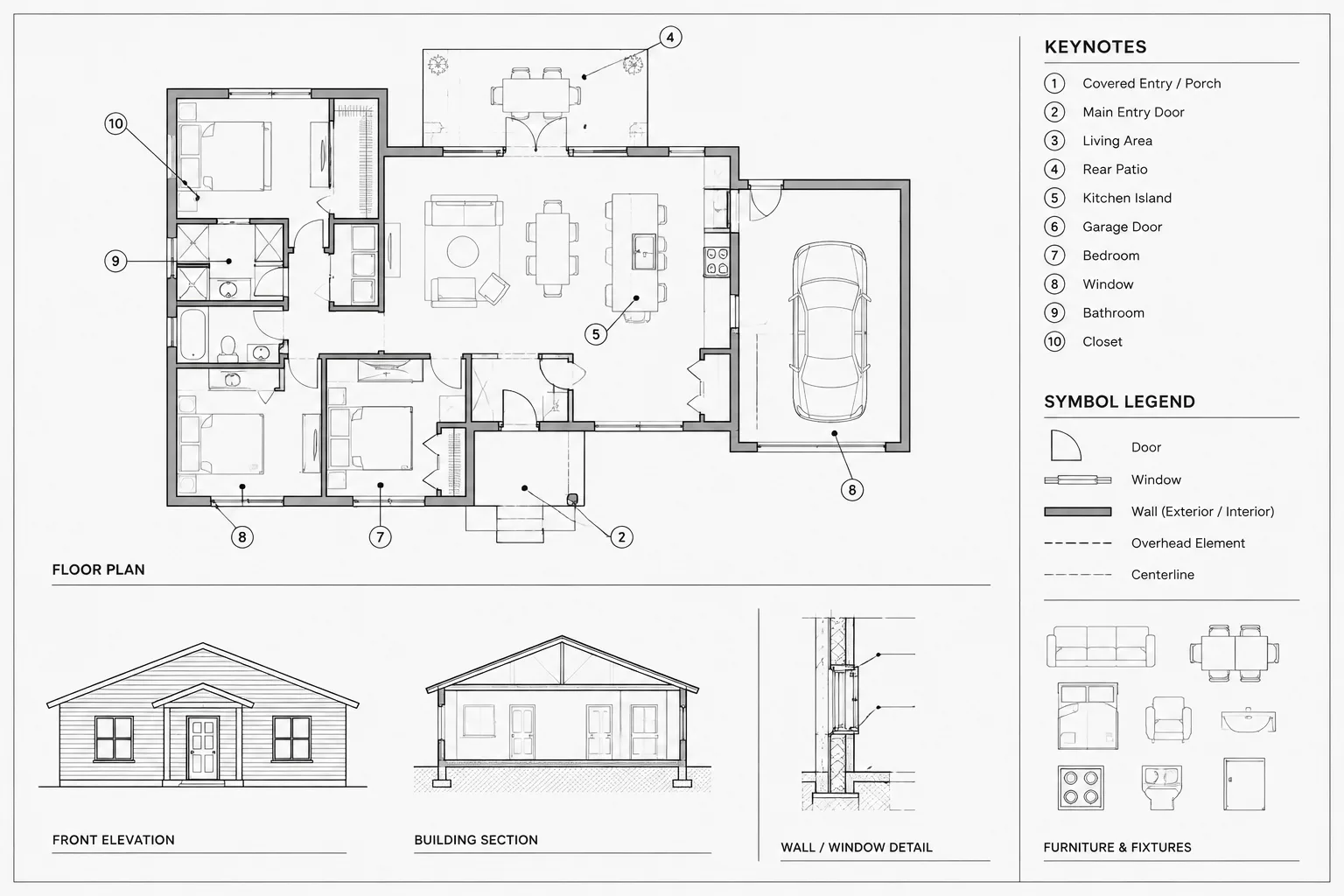
A keynote consists of two connected parts: a marker placed near the relevant drawing condition and a note list that explains the marker. The marker may contain a number, letter-number combination, or another project-defined identifier. Its meaning comes from the associated note text, not from the symbol alone.
Keynotes are most useful when the same concise instruction applies in several locations or when full notes would make a drawing difficult to read. They should not be used to hide unresolved design decisions or compress complex requirements into vague phrases. If a condition needs a dimension, detail reference, material designation, or assembly description, the drawing set should provide that information through the appropriate documentation method.
Choose a keynote system before drafting
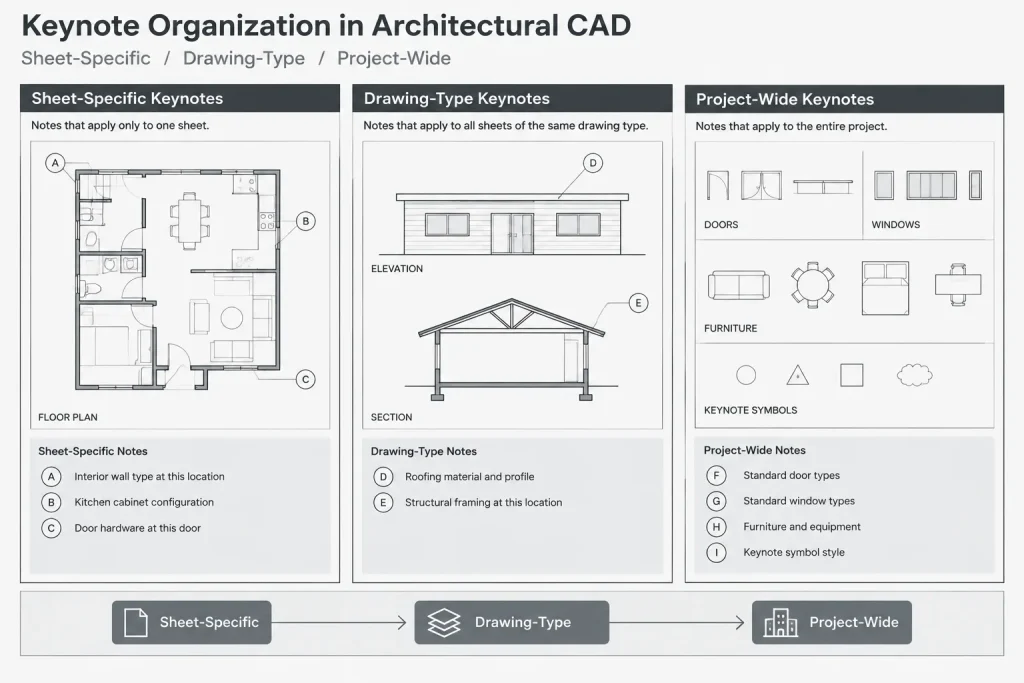
Projects generally benefit from one clearly defined keynote system rather than several informal systems created by different drafters. The chosen approach should reflect the size of the drawing set, the amount of repetition, and the team’s ability to maintain shared note data.
| System | How it works | Best use | Main coordination risk |
|---|---|---|---|
| Sheet-specific notes | Identifiers refer to a note list located on the same sheet. | Drawings with notes that are mostly unique to each sheet. | The same instruction may receive different identifiers on different sheets. |
| Drawing-type notes | A coordinated set is maintained for plans, elevations, details, or another drawing category. | Projects with repeated conditions within a drawing discipline or view type. | Users may look in the wrong note group if its scope is unclear. |
| Project-wide notes | Identifiers retain the same meaning throughout the architectural set. | Large sets with frequently repeated instructions and controlled note management. | Unused, obsolete, or duplicate entries can accumulate without active maintenance. |
A project-wide system can improve consistency, but it also demands stronger administration. A sheet-specific system is easier to understand locally, yet repeated text can drift between sheets. Whichever system is selected, document the rule in the CAD standards or project execution notes so that every contributor uses the same method.
Build a controlled keynote source
Create a single working source for the current keynote identifiers and text. Depending on the office workflow, this may be a controlled CAD note file, a project schedule, a database, or another shared document. The important point is that contributors should not maintain conflicting private lists.
A useful keynote record may include:
- The unique identifier shown in the marker.
- The approved note text.
- The drawing category or scope where the note may be used.
- The responsible author or discipline.
- A status indicating whether the note is active, under review, or retired.
- Optional internal comments that are not published on the drawing.
Keep keynote text direct and specific. Avoid writing several unrelated instructions under one identifier merely because they occur in the same area. Conversely, do not create multiple identifiers for wording that communicates the same requirement. Reviewing the list for near-duplicates before annotation begins can prevent unnecessary growth.
Create a dependable CAD marker
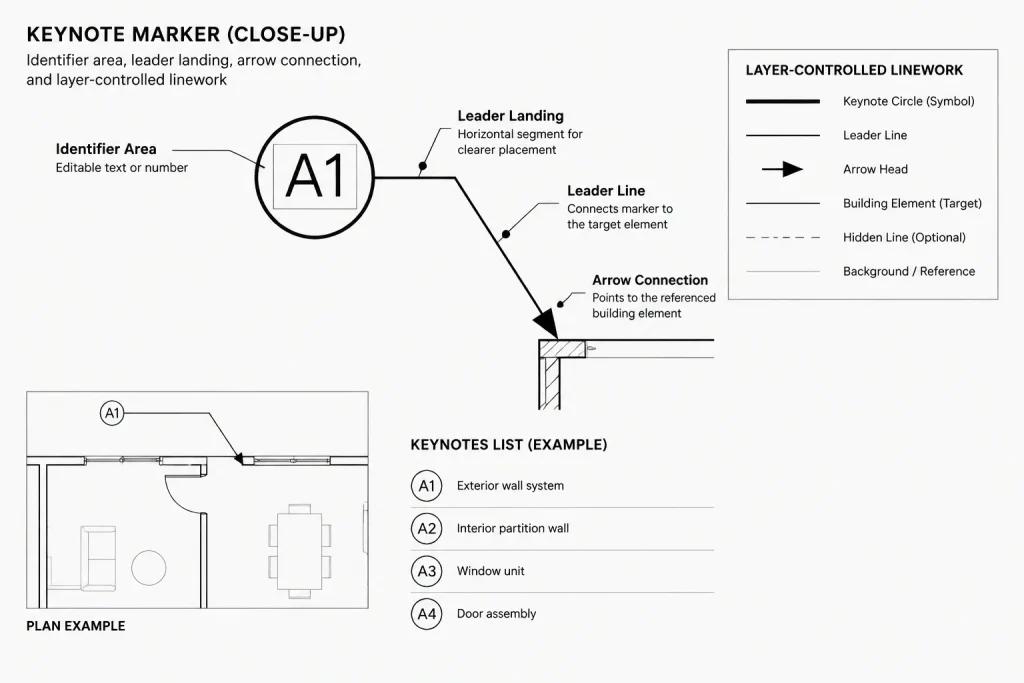
The keynote marker should be built as a controlled block or multileader style rather than redrawn manually. A typical marker includes a boundary shape, an editable identifier, and a leader connection. Its appearance should remain legible at the intended plotted scale and should be consistent across sheets.
If the identifier is stored as a block attribute, establish a predictable attribute tag and text alignment. Keep the visible identifier separate from unrelated hidden data so editing remains straightforward. When a multileader contains the marker, test its landing, leader attachment, and text orientation in each direction in which it will be used.
Use layer-controlled properties for color, linetype, and lineweight unless the project has a deliberate reason for an override. Avoid exploding keynote markers. Exploded symbols lose consistent editing behavior and become harder to identify during quality control.
Prevent identifier display problems
- Allow enough space in the marker for the project’s identifier format.
- Keep the text centered and visually balanced.
- Confirm that mirrored or rotated markers remain readable.
- Check that annotation scaling or viewport treatment does not produce mixed symbol sizes.
- Avoid placing masks where they hide dimensions, wall lines, or other essential information.
Place keynotes according to drawing meaning
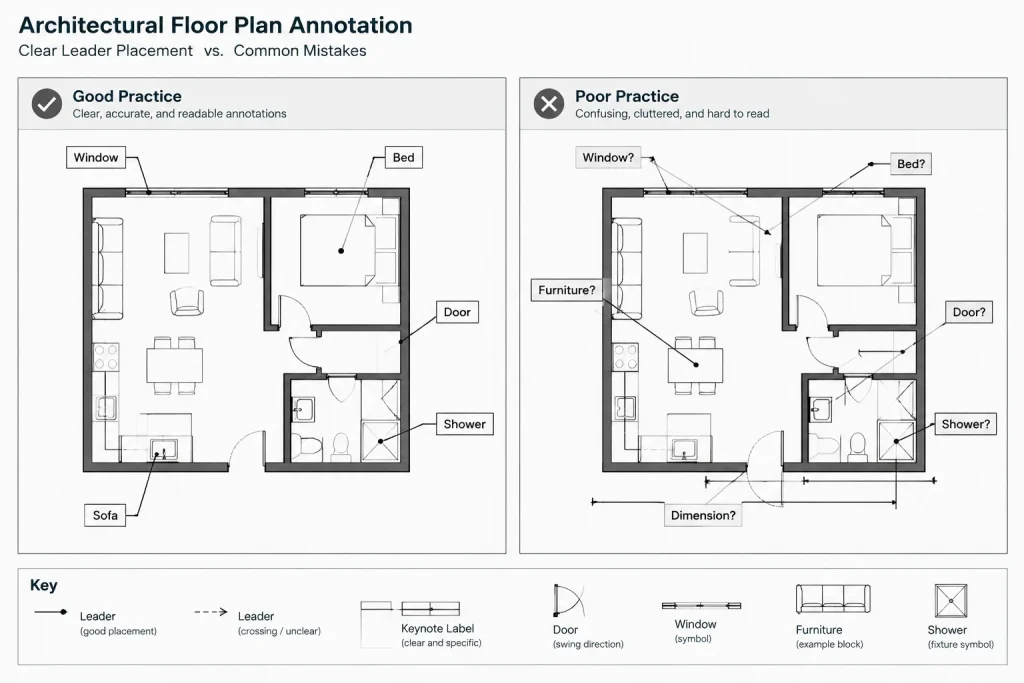
A leader should terminate at the actual object, edge, surface, or area addressed by the note. Do not point vaguely into a crowded group of components and expect the reader to infer the target. If one instruction applies to several similar objects, show the scope clearly through multiple leaders, a defined boundary, or another project-approved graphic method.
Arrange markers outside dense geometry where possible. Keep leader paths short, reduce crossings, and avoid routing leaders through dimensions or room tags. Nearby keynote markers can be aligned into an orderly group, but visual alignment should never weaken the connection between a marker and its intended target.
When a condition appears in plan and section, decide whether both views need the keynote. Repeating a note can help readers, but it also creates another location that must be updated. If one view is the primary source of information, the other view may be better served by a detail or section reference rather than duplicate instructions.
Coordinate notes with details and specifications
A keynote should support the drawing hierarchy, not compete with it. Notes identify what must happen at a location; dimensions establish controlled geometry; detail references direct the reader to enlarged construction information; material tags identify finishes or assemblies; and specifications may contain broader product and execution requirements.
Avoid keynotes that merely say to see another document without identifying the relevant drawing condition. Also avoid embedding unverified code conclusions, product performance claims, or construction requirements in copied office notes. Project teams should review technical language against the current design, consultant information, applicable requirements, and selected products.
Consultant backgrounds need special attention. Architectural keynotes should not be merged casually into engineering files, and consultant annotations should not be absorbed into architectural note lists without confirming ownership. Clearly separate discipline-specific information through layers, references, and defined authoring responsibility.
Manage changes without breaking references
Changing keynote text is safer when the identifier still describes the same condition. If an edit substantially changes the meaning, determine whether a new identifier is more appropriate. Reusing a retired identifier for an unrelated instruction can make archived sheets, revision comparisons, and field markups difficult to interpret.
When removing a keynote, review both directions: find every marker using that identifier and verify whether the note-list entry is still needed. A note list with no placed markers may contain obsolete content, while a marker with no listed explanation is an unresolved reference.
Do not renumber an entire keynote list late in the drawing process merely to remove gaps. Sequential appearance is less important than stable references. If identifiers must change, use a controlled process and check every affected sheet rather than relying on visual memory.
Quality-control checklist
Review keynotes in the plotted sheet context, not only in model space. A complete check should include the marker, leader, target, note list, and related drawing information.
- Every visible marker has a matching note-list entry.
- Every published note-list entry is used or intentionally retained.
- Duplicate identifiers do not contain different text.
- Equivalent notes have not been created under multiple identifiers.
- Leaders terminate at unambiguous drawing conditions.
- Markers do not cover dimensions, tags, or critical geometry.
- Keynote size and lineweight are consistent across viewports.
- Plan, elevation, section, and detail notes describe the condition consistently.
- Retired notes have been removed from active sheets and reusable source files.
- PDF output has been checked for clipping, masking, and unreadable overlaps.
A maintainable keynote workflow
Begin with a defined note system and a controlled source list. Create a standardized CAD marker, assign clear layer and text behavior, and place leaders according to the actual scope of each instruction. During revisions, protect identifier stability and review both placed markers and note-list entries.
The strongest architectural keynote system is not necessarily the most automated. It is the one the project team can understand, update, and verify consistently. Treating identifiers as coordinated drawing references—rather than decorative bubbles—produces cleaner sheets and more dependable architectural documentation.
Putting the workflow into practice
A dependable implementation begins by assigning responsibility for the keynote source. Team members need to know who may approve note text, introduce identifiers, retire entries, and resolve conflicts. Without defined ownership, even a well-designed CAD marker can become disconnected from the information it represents.
Use a clear review path
Keynote review is most effective when it follows the same path as the drawing information. Start with the object or condition, follow the leader to the marker, locate the matching list entry, and then compare the wording with related dimensions, tags, details, and consultant information. This approach tests meaning rather than checking symbols in isolation.
Separate drafting checks from technical review
Drafting quality control should confirm marker consistency, leader placement, layer behavior, legibility, and reference matching. Technical review should confirm that the note accurately describes the intended condition and does not conflict with other project documents. Both reviews are necessary, but they address different risks.
Prepare keynotes for project handoff
Before archiving or transferring the CAD files, remove abandoned experiments from active note sources and identify any entries intentionally retained for future use. Keep marker definitions, layer conventions, and approved note data together with the drawing set so another contributor can understand the system without reconstructing its logic.
A coordinated keynote system should make drawing interpretation faster, not shift uncertainty from the sheet into an unmanaged list. Stable references, controlled wording, and repeatable review practices provide the foundation for reliable use.
Frequently asked questions about architectural keynotes in CAD
What is the difference between a keynote and a general note?
A keynote uses a marker to connect a specific drawing condition with an entry in a coordinated note list. A general note usually applies more broadly and may not point to a particular object or location.
Should keynote identifiers be changed when note wording is edited?
Minor clarification may not require a new identifier if the note still describes the same condition. If the meaning changes substantially, the team should consider a new identifier and review every affected reference.
Can the same keynote appear in several views?
Yes, when the same instruction genuinely applies and repetition improves interpretation. Each additional marker must remain coordinated, so unnecessary duplication should be avoided.
Why should keynote markers remain as controlled CAD objects?
Controlled blocks or multileader styles support consistent appearance, editing, layer management, and quality control. Manually redrawn or exploded markers are harder to update and audit.
How can missing keynote references be found?
Compare placed identifiers against the published note list in both directions. Check that every marker has an entry and that every listed note is used or intentionally retained. The plotted output should also be reviewed for hidden, clipped, or overlapping markers.
Should consultant notes be included in the architectural keynote list?
Only when responsibility and coordination have been explicitly established. Discipline-specific notes should not be absorbed into the architectural system without confirming authorship, scope, and consistency with the consultant documents.