Architectural CAD file naming works best when it supports the entire drawing lifecycle rather than acting as an isolated labeling exercise. The convention should help team members recognize a DWG, understand its role, locate the active source, and distinguish editable work from issued or superseded records.
This guide explains how naming grammar, folder structure, external references, issue procedures, and archive practices work together. Use the principles as a framework for an office or project-specific protocol, then document the approved terms so that every participant applies them consistently.
A clear architectural CAD file naming system helps a project team find the correct drawing, identify its purpose, and avoid referencing obsolete work. Naming alone, however, is not version control. A dependable workflow also needs defined folders, controlled issue procedures, and a clear distinction between active files, transmitted records, and temporary working copies.
The goal is not to create the longest or most elaborate filename. It is to give each DWG a stable identity that remains understandable when the file is viewed outside its original folder or sent to another project participant.
What a CAD Filename Should Communicate
A useful filename answers the questions that matter before someone opens the drawing:
- Which project does the file belong to?
- Which discipline or team created it?
- What building, area, floor, or drawing type does it contain?
- Is it an active model, a sheet file, a background, or an issued record?
- Is the file current work or an archived snapshot?
Not every answer must appear in the filename. Some information may already be established by the project folder structure. The naming convention should add useful identification without repeating the entire directory path.
Build a Consistent Naming Grammar
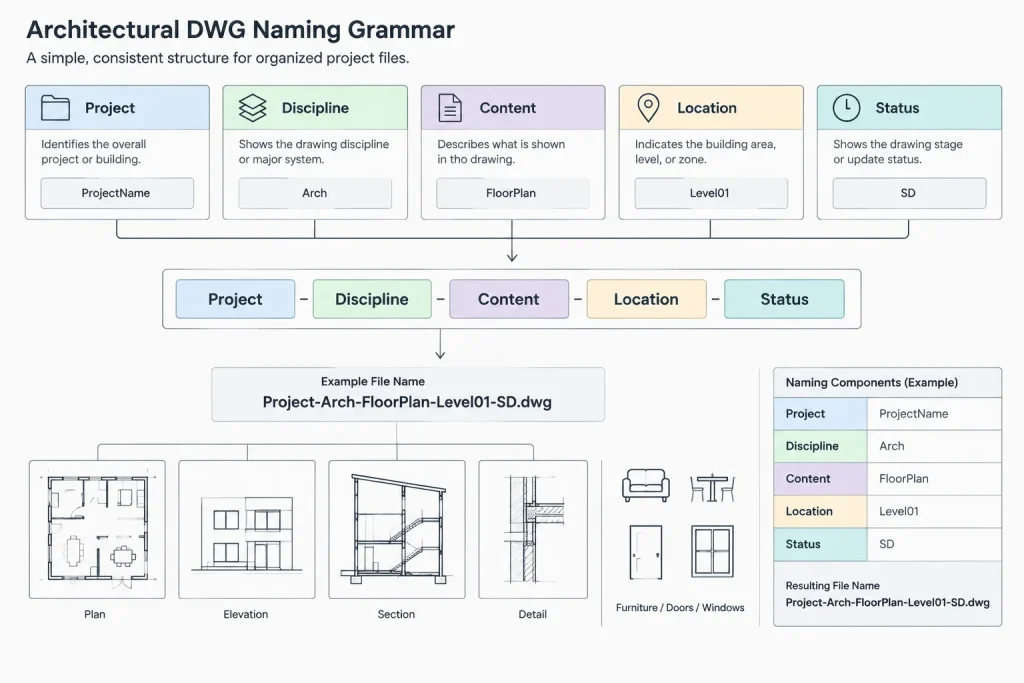
A naming grammar is the agreed order of filename fields. A small architectural office might use a compact structure, while a multidisciplinary project may require additional identifiers. A conceptual pattern could be:
Project_Discipline_Content_Location_Status.dwg
The words above describe fields, not mandatory abbreviations. Each office should define its own approved values and document what they mean.
| Field | Purpose | Practical consideration |
|---|---|---|
| Project | Separates the drawing from files belonging to other projects | Use the established project identifier rather than an informal nickname |
| Discipline | Identifies the authoring team | Coordinate abbreviations across the project instead of letting each user improvise |
| Content | Describes the drawing function, such as plan, elevation, detail, or sheet | Choose terms that distinguish model content from plotted sheet files |
| Location | Identifies a building, level, zone, or area when needed | Match identifiers used in the drawings and project documentation |
| Status | Distinguishes active, shared, issued, or archived material | Do not rely on vague labels such as final or latest |
Separators should also be consistent. Hyphens and underscores are both readable when used predictably. Avoid switching between spaces, punctuation, and mixed separators within the same project. Also avoid characters that may cause problems in file systems, transfer tools, or external reference paths.
Separate Model Files from Sheet Files
One of the most useful naming distinctions is between files containing architectural model geometry and files used to compose sheets. A model DWG might contain a floor plan, roof plan, or building section geometry. A sheet DWG may contain a title block, viewports, sheet-specific notes, and plotted presentation.
If both file types are named only by sheet number, users may struggle to determine which files should be edited, referenced, or plotted. Include a consistent content identifier so the role of each file is evident.
Model filenames should remain stable
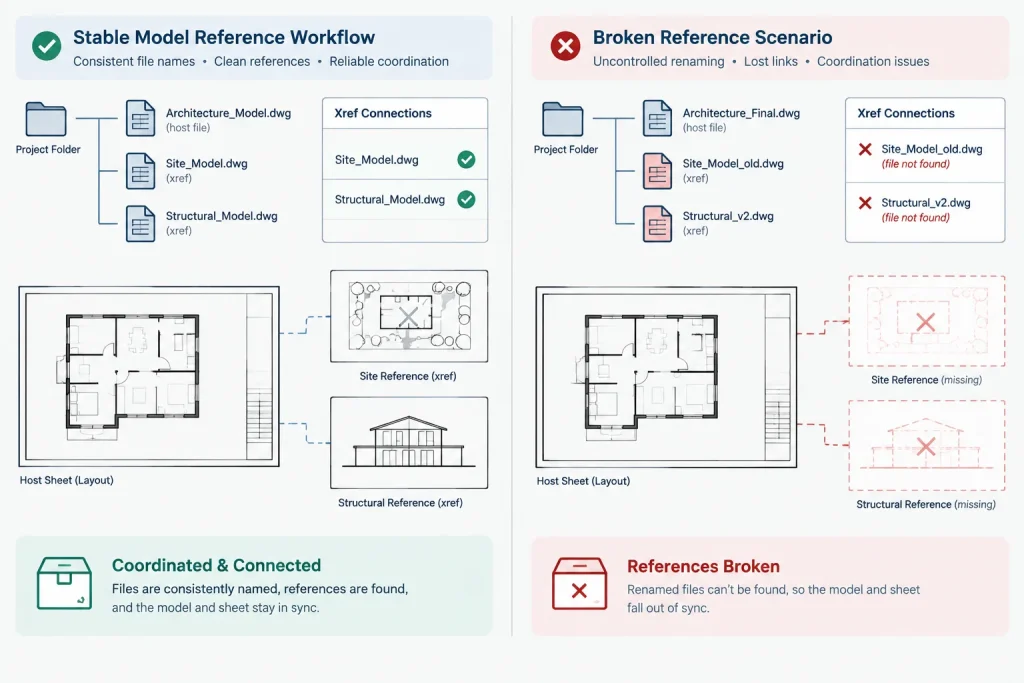
Model files are commonly used as external references. Renaming or moving them casually can break reference paths or cause users to attach the wrong replacement. Once a referenced model name has been established, treat it as part of the project structure.
If the content evolves from an early layout into a documented plan, consider whether its identity has actually changed. A status change does not always require a new active filename. Maintaining a stable current file can reduce repeated xref repathing and duplicate references.
Sheet filenames should match the sheet workflow
A sheet file should be easy to associate with its title block and drawing index entry. Depending on office practice, its name may include the sheet designation, drawing title category, or both. The team should decide how a sheet is renamed if its number changes and verify that publishing or sheet-management data remains coordinated.
Do Not Use “Final” as Version Control
Filenames such as final, final-new, latest, or use-this-one describe a user’s opinion rather than a controlled project state. Their meaning disappears as soon as another change is made.
A better workflow maintains one clearly identified active file and creates protected snapshots at deliberate milestones. The current working file keeps its stable name, while archived or issued copies receive context through their folder location, issue record, or controlled snapshot name.
Organize Files by Project State
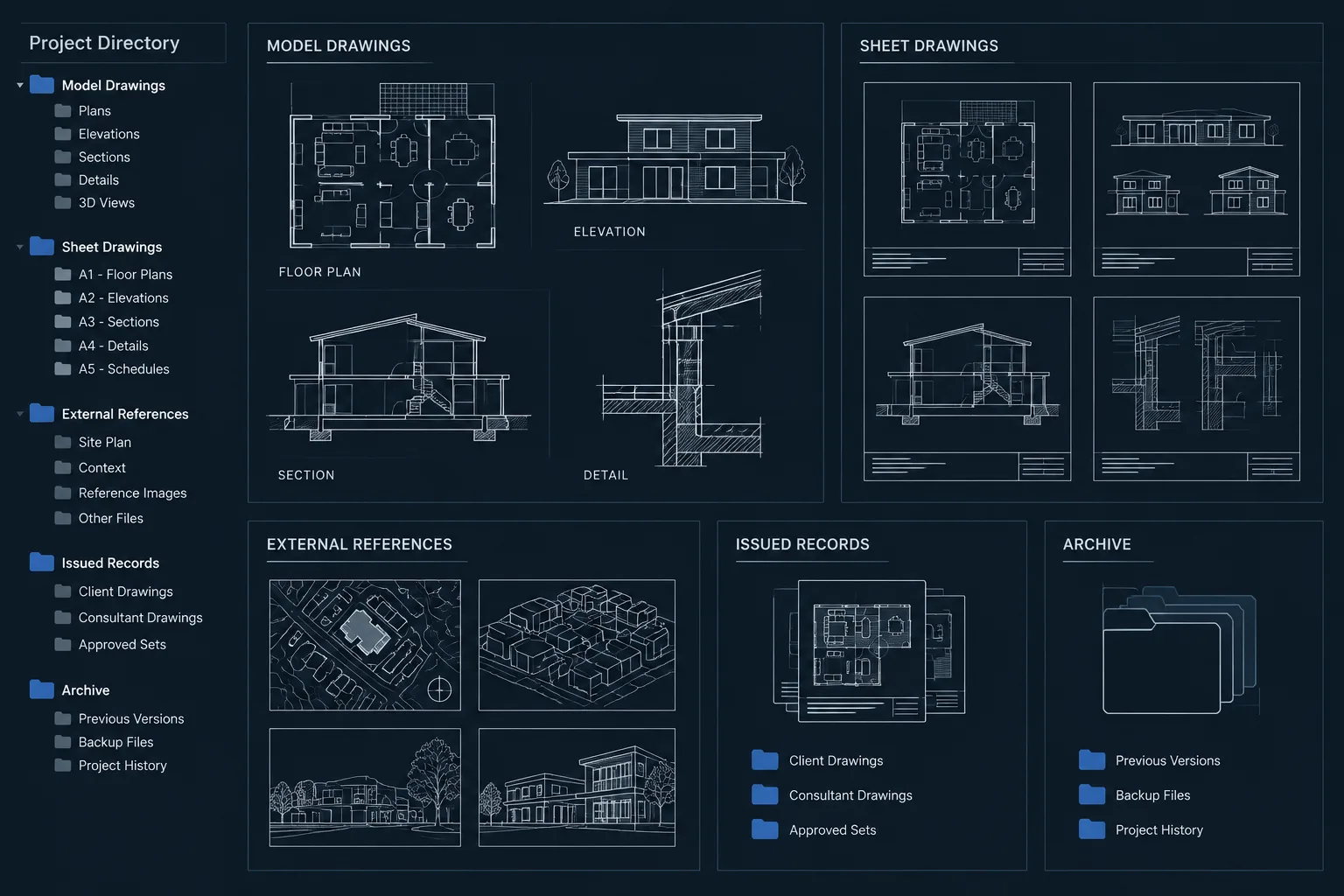
Folder organization should reinforce the filename convention. A practical project may separate files into categories such as:
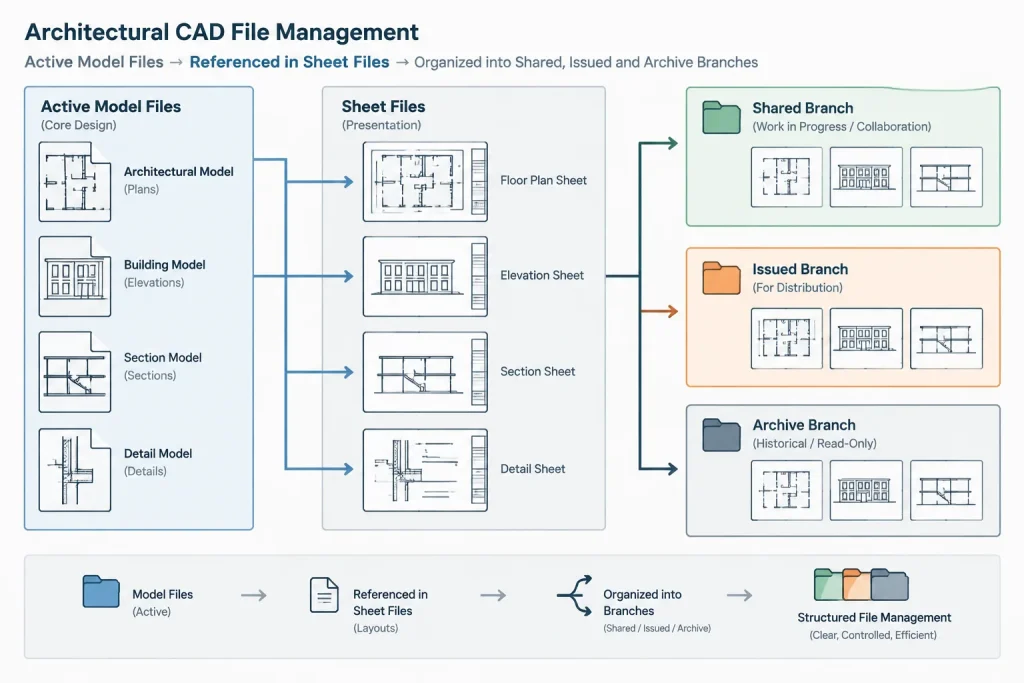
- Active work: Current files authorized for editing.
- References: Consultant backgrounds, surveys, linked architectural models, and other controlled inputs.
- Shared files: Coordinated exports or backgrounds prepared for project participants.
- Issued records: Copies corresponding to a formal drawing issue or transmission.
- Archive: Superseded snapshots retained for project history.
- Temporary output: Test plots, conversion files, and short-lived coordination exports.
Folder names can differ, but their purposes should not overlap. In particular, issued records should not remain editable working files. Preserve them as a record of what was transmitted, and continue new work in the active area.
Revision Information: Filename or Drawing Data?
Drawing revisions are normally communicated through the project’s formal sheet and issue process. Adding every revision identifier to an active DWG filename can create duplicate files and broken references. It can also leave uncertainty about which copy is the live source.
Use filename revisions only when the documented workflow calls for separate deliverables or snapshots. Otherwise, keep revision information in the appropriate title-block fields, revision records, issue logs, or controlled document system. The critical point is that the filename, drawing title block, drawing index, and transmitted package must not contradict one another.
Handle Dates Carefully
Dates are helpful for archive folders, received consultant files, and issue snapshots. They are less useful as the only identifier for active content. Several files may be created or modified on the same day, and a file’s system-modified date can change during copying or transfer.
If dates are used in names, choose an unambiguous ordering and apply it consistently. Do not mix different date arrangements within the same project. Pair the date with a description of the event, such as received, shared, issued, or archived, so users understand what the date represents.
Manage Consultant and Incoming Files
Do not immediately rename incoming consultant DWGs without recording their original identity. Renaming can make later coordination difficult when the consultant refers to the source filename.
A controlled process can preserve the received package, record who supplied it and when, and then create a project-ready reference copy if normalization is required. If a file is renamed for internal use, maintain a simple mapping between the original filename and the internal filename.
Before replacing an existing background, compare the incoming file with the currently referenced version. Confirm its coordinate position, units, extents, floor or area designation, and relevant content. A matching filename does not prove that a background is compatible.
Common Naming Problems
- Personal initials as the main version indicator: These identify an editor but do not establish which file is approved for continued work.
- Duplicate active folders: Users may edit separate copies without realizing that the project has diverged.
- Overloaded filenames: Excessive fields make names hard to scan and encourage inconsistent abbreviations.
- Uncontrolled abbreviations: Similar content receives several names, making searching and sorting unreliable.
- Renaming referenced files without coordination: Host drawings may report missing references or retain links to obsolete copies.
- Mixing issue records with live work: Later edits can overwrite the historical record of a transmitted drawing.
- Depending on backup files as archives: Automatic recovery or backup files are not substitutes for deliberate project snapshots.
A Practical Implementation Workflow
Define the file types
List the DWG categories the project will use, including model files, sheet files, details, backgrounds, exports, and temporary coordination files. Remove categories that do not serve a clear purpose.
Define allowed identifiers
Create a short project reference showing approved discipline, building, level, zone, and content terms. This is more reliable than expecting users to remember unwritten abbreviations.
Create the folder structure early
Establish active, reference, shared, issued, and archive locations before significant drafting begins. Assign editing responsibility where needed.
Test external references
Attach representative files using the project’s intended path strategy. Move a test package through the expected sharing process and confirm that references resolve in the receiving location.
Control changes to established names
When a referenced file must be renamed, identify every host drawing that uses it. Update references deliberately, reload them, and inspect the affected views before deleting or archiving the old source.
Review before each issue
Check filenames against sheet titles, drawing index entries, xref listings, and the issue package. Remove temporary files and verify that the transmitted folder contains only the intended records.
Final Quality-Control Checklist
- Every DWG has an identifiable project and drawing purpose.
- Model, sheet, reference, and archive files are distinguishable.
- Active files do not use ambiguous labels such as final or latest.
- Referenced model names remain stable unless a coordinated change is necessary.
- Incoming consultant files retain traceable source information.
- Issued records are separated from editable work.
- Dates and abbreviations follow one documented format.
- Sheet filenames, title blocks, and drawing index information agree.
- Obsolete copies cannot be mistaken for current project files.
Effective architectural CAD file naming is less about inventing a perfect code and more about maintaining a predictable system. Stable names, distinct project states, controlled archives, and coordinated references allow users to understand a DWG before opening it—and reduce the risk of drafting from, plotting, or transmitting the wrong file.
Turn the Naming Convention into a Team Control
A naming standard becomes useful only when it is applied at file creation, coordination, issue, and archive stages. If users correct names only before transmission, host drawings may already contain inconsistent references and parallel working copies may already exist.
Assign responsibility for maintaining the approved identifiers and deciding when an established filename may change. This does not need to become a complicated administrative process. The essential requirement is that users know which location contains the active source and who can authorize a change that affects other drawings.
Prioritize identity over change history
The active filename should primarily describe what the drawing is. Change history belongs in controlled snapshots, issue records, drawing data, or the project document system. Separating identity from history keeps the active source recognizable while preserving evidence of what was shared or issued.
Make handoffs understandable without personal knowledge
A resilient project structure should remain understandable when work passes to another drafter or returns after a long pause. Test the system by asking whether a user unfamiliar with recent activity can locate the live model, identify the corresponding sheets, trace incoming backgrounds, and find the applicable issued record without relying on personal folders or verbal instructions.
Include file structure in drawing reviews
Quality control should examine more than visible geometry. Reviewers should also confirm that referenced files come from controlled locations, sheet files point to the intended models, archive material cannot be edited accidentally, and temporary exports are not presented as project sources.
When a Filename Change Is Justified
Renaming may be appropriate when the drawing’s actual identity changes, such as reassignment to a different building, area, discipline, or file role. A routine content update generally does not require a new active filename.
Before changing an established name, determine where the file is referenced, published, indexed, transmitted, or recorded. Coordinate the replacement and preserve traceability to the previous identity. The purpose is not to prevent all renaming, but to prevent an isolated change from creating missing references or competing sources.
Frequently Asked Questions
Should every project use the same CAD filename structure?
An office-wide grammar can improve consistency, but the required fields may vary with project complexity and team structure. Keep the field order predictable while allowing the documented project protocol to define which identifiers are necessary.
Should the revision appear in every DWG filename?
Not automatically. Repeatedly renaming an active file for revisions can create duplicate sources and disrupt external references. Use revision identifiers in filenames only when the established issue or snapshot procedure requires them.
Can folder names replace filename information?
Folders can provide project context, but a DWG may be copied, transmitted, or viewed outside its original directory. The filename should retain enough identity to remain understandable without duplicating the complete folder path.
How should a team handle a consultant file with an unfamiliar name?
Preserve the received file and its original identity. If the team creates a normalized reference copy, record the relationship between the source name and the internal name so later updates can be traced and compared.
Is a backup file the same as a controlled version?
No. A backup may support recovery, but it does not necessarily document why a file was preserved, what project state it represents, or whether it was formally shared. Controlled snapshots need clear context and deliberate storage.
What should happen when an xref source is renamed?
Identify the host drawings that reference it, update those paths deliberately, reload the references, and inspect the affected views. Keep the previous source traceable until the coordinated replacement has been verified.