Drafting guards and handrails requires more than adding a rail line beside a stair, ramp, landing, or exposed edge. The CAD geometry must communicate where the assembly runs, how it changes between sloped and level conditions, what supports it, and how it relates to finishes, structure, doors, glazing, and circulation space.
This guide presents a view-based coordination workflow for architectural drawings. It focuses on building clear, editable geometry while recognizing that code criteria, structural connections, product requirements, and fabrication decisions must be verified through the appropriate project sources.
Guards and handrails often appear simple in a floor plan, but their actual geometry can affect stairs, ramps, landings, balconies, wall clearances, doors, finishes, and structural supports. A single line labeled “rail” rarely provides enough information for reliable coordination.
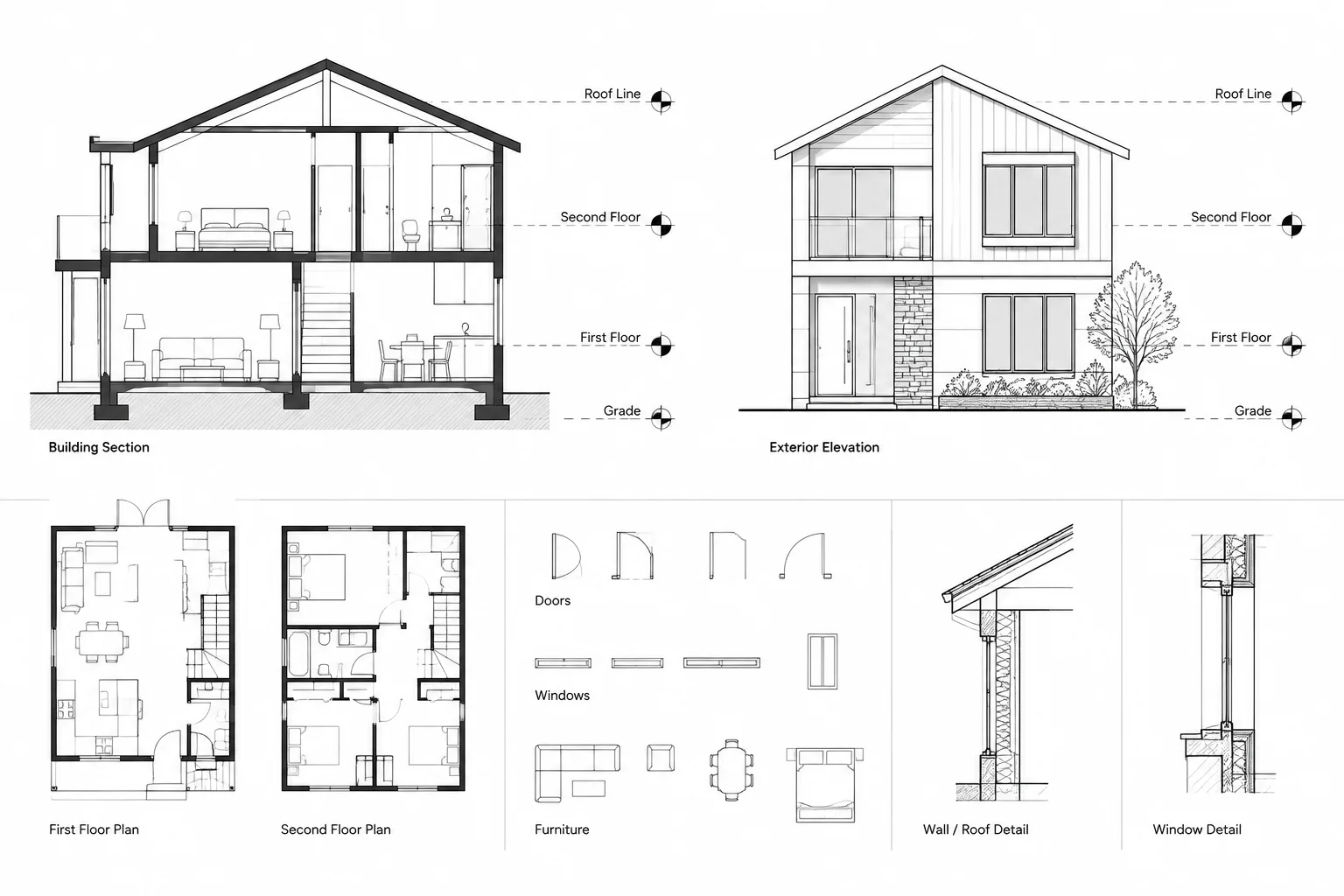
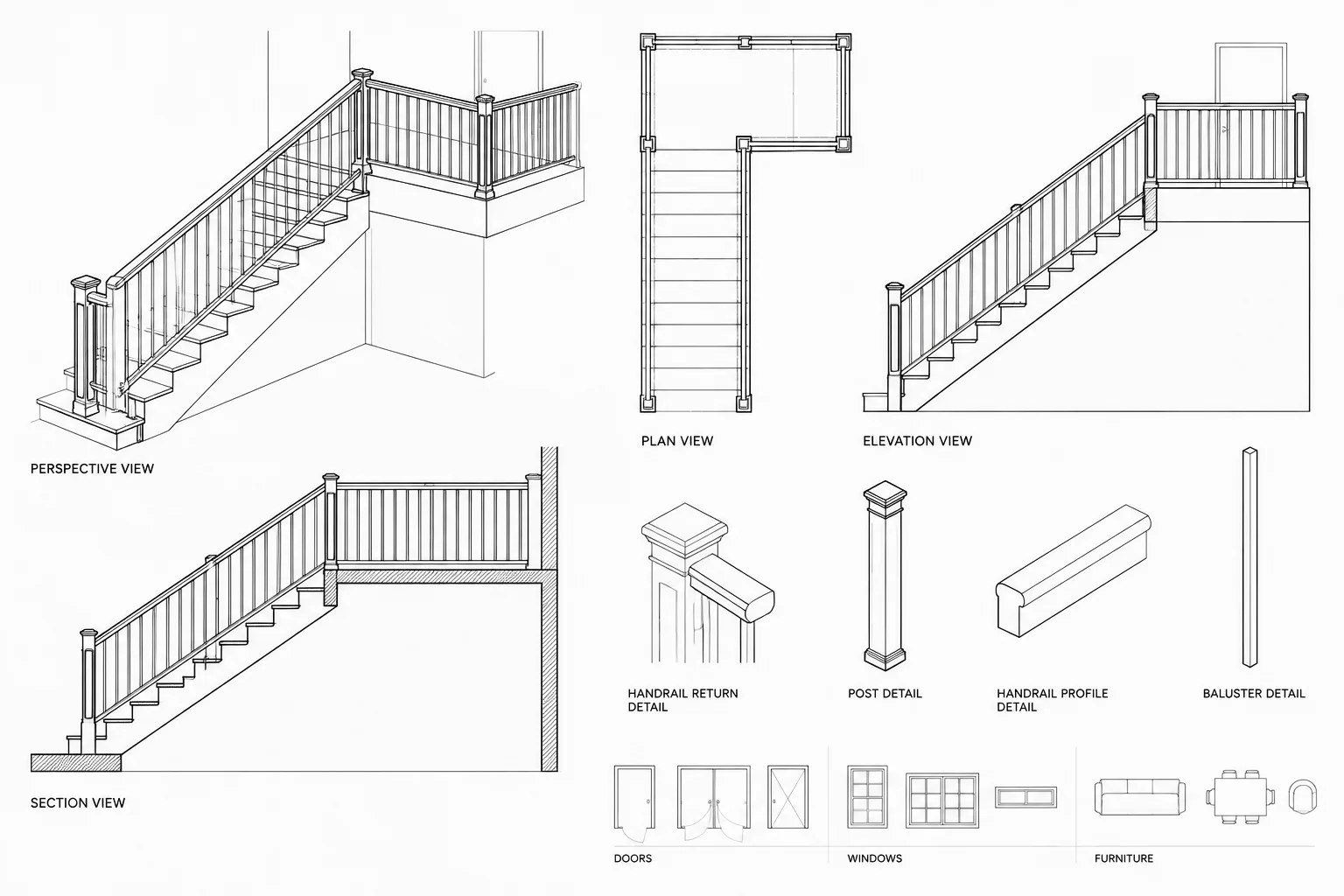
An effective CAD workflow treats the railing system as a coordinated assembly shown across several views. The plan establishes location and continuity, elevations explain vertical relationships, sections clarify edge and mounting conditions, and details communicate connections and terminations. Project requirements, applicable codes, accessibility criteria, engineering, and manufacturer information must be verified separately rather than inferred from a generic CAD block.
Distinguish the Components Before Drafting
Start by separating terms that are frequently used interchangeably. A handrail is intended to provide a continuous handhold along a stair, ramp, or other circulation path. A guard is a protective barrier placed at an exposed edge where required. Depending on the design, a guard assembly may also support a handrail, but the two components do not automatically share the same profile, elevation, or termination.
A coordinated railing assembly may include:
- Top rails, handrails, or both
- Posts, balusters, panels, pickets, or other infill
- Wall brackets and mounting plates
- Base plates, embeds, anchors, or fascia-mounted supports
- Returns, bends, transitions, and extensions
- Gates or removable sections
- Connections to walls, floors, curbs, stringers, and landings
- Finish designations and fabrication references
Separating these parts in the drawing makes it easier to identify which items are architectural, structural, delegated-design, or product-specific responsibilities.
Build the CAD Geometry from Coordinated References
Begin with the circulation and edge geometry
Do not begin by placing a generic railing block. First verify the stair, ramp, landing, slab edge, balcony edge, curb, or retaining condition that controls the assembly. Confirm that referenced backgrounds are current and aligned with the project coordinate system.
Trace or construct a clean control path that represents the intended rail alignment. This path should respond to corners, landings, changes in slope, openings, and wall conditions. Keep it on a nonplotting construction layer or another clearly managed layer if it is not intended to appear on sheets.
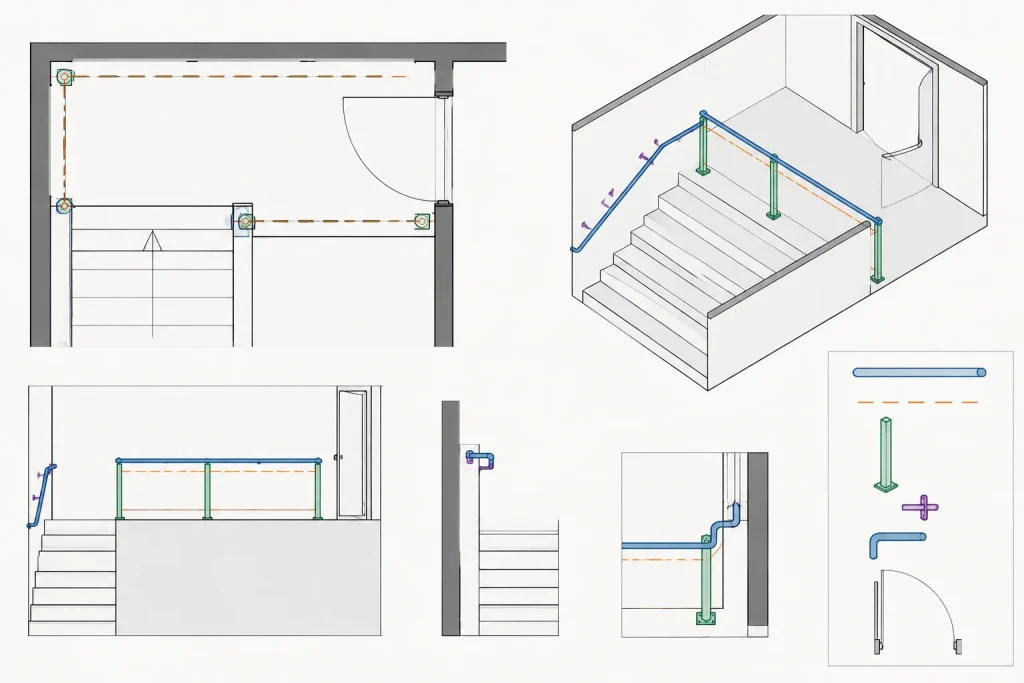
Use offsets carefully
An offset line can help establish the relationship between a rail and a wall, stair edge, or slab edge, but it should not be treated as proof of compliance. The controlling distance may depend on the actual handrail profile, bracket projection, finish thickness, post base, fabrication method, and applicable requirements.
After creating an offset, inspect corners and transitions manually. Automatic offsets can produce unwanted loops, sharp intersections, or misaligned segments where geometry changes direction.
Separate repeated parts from project-specific geometry
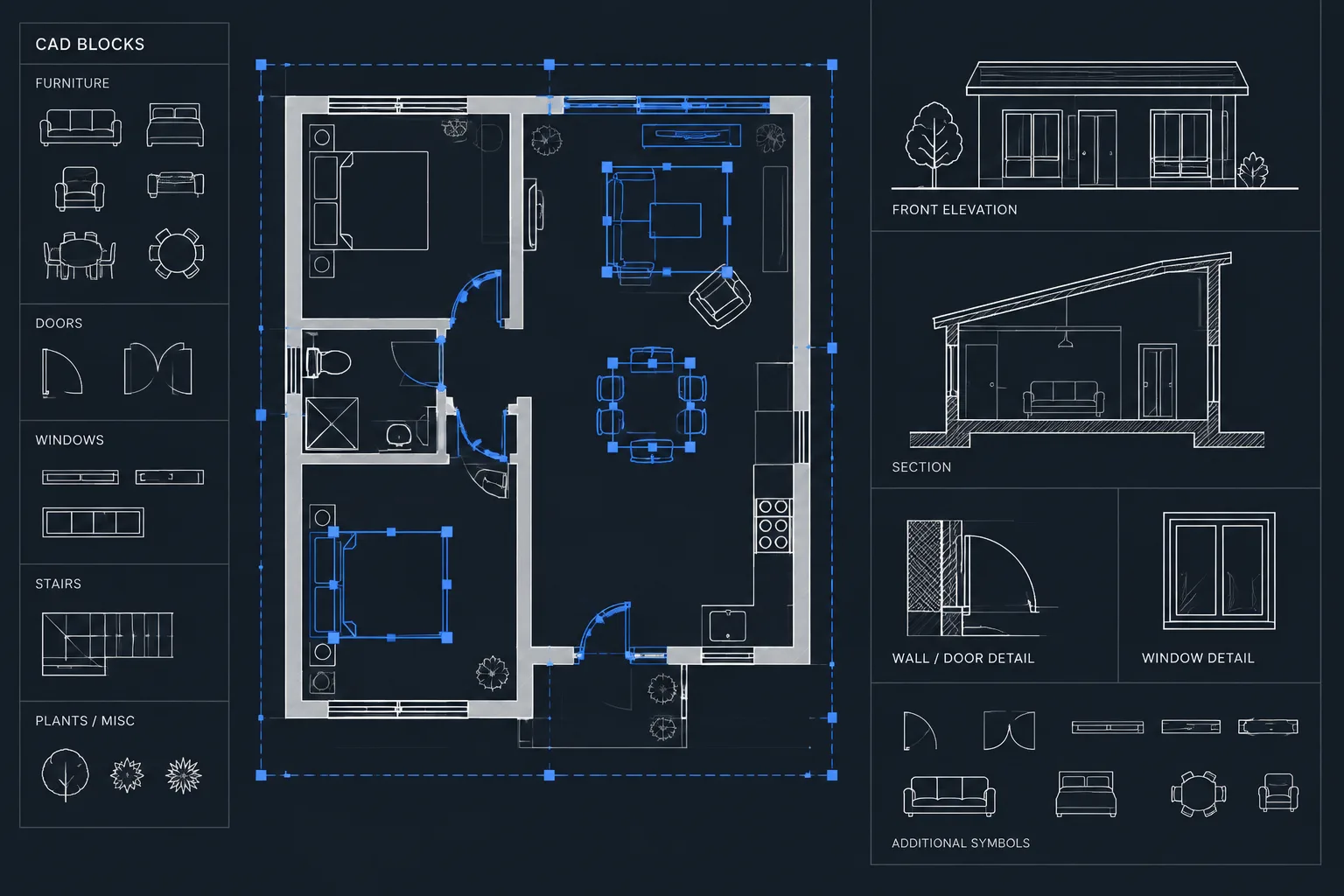
Blocks are useful for repeated posts, brackets, base plates, and standard termination symbols. Continuous rails, sloped runs, and irregular transitions are often easier to coordinate as polylines or purpose-built geometry. Avoid forcing every condition into one complex block if that makes editing or checking difficult.
If dynamic or parameter-driven blocks are used, define a limited set of tested configurations. Include a clear insertion point and document what the block represents. A symbolic plan block should not be mistaken for fabrication geometry.
What Each Drawing View Should Communicate
| View | Primary information | Common coordination issue |
|---|---|---|
| Plan | Rail path, posts, openings, returns, wall relationships, and nearby doors | A continuous line hides breaks, gates, or mounting changes |
| Elevation | Top profile, sloped and level segments, post rhythm, infill, and terminations | Level and sloped rails do not transition cleanly |
| Section | Edge condition, support location, clearances, and mounting relationship | The rail conflicts with finishes, structure, or circulation space |
| Detail | Brackets, plates, returns, joints, anchors, and material interfaces | A generic detail does not match the actual project condition |
Floor plans
In plan, show the rail with enough width or component separation to explain its location. A single centerline may be acceptable at a small scale, but enlarged plans should distinguish the handrail, guard face, posts, wall brackets, and significant mounting offsets when those items affect usable space.
Check rail geometry against door swings, maneuvering areas, floor openings, stair runs, ramp landings, columns, glazing, casework, and equipment. Pay particular attention to rail ends near circulation routes. A return or extension that looks harmless in elevation may project into an adjacent path in plan.
Elevations
Use elevations to coordinate sloped rails with stair nosings or ramp surfaces and level rails with landings or floor edges. Show changes in direction and height as actual geometry rather than relying only on notes. Post spacing and infill should be shown consistently enough to reveal conflicts, while final fabrication criteria remain subject to verified design information.
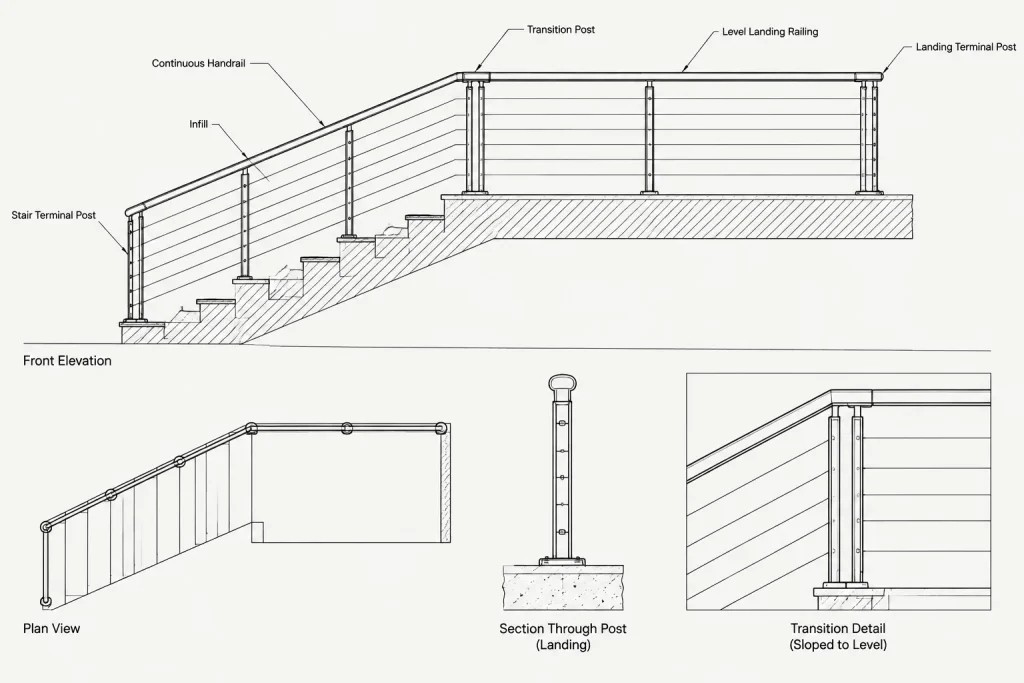
At stairs, compare the railing elevation with the stair section. If each view was drafted independently, landing transitions and end conditions can easily disagree.
Sections and enlarged details
Sections should reveal whether the system is mounted on top of a slab, attached to a fascia, connected to a stringer, fixed to a curb, or supported by another element. Include finish build-ups that affect the mounting surface. A base plate drawn directly on structural geometry may be inaccurate once tile, pavers, waterproofing, wall finishes, or edge trims are considered.
Enlarged details should be based on the actual condition shown in plan and section. Avoid attaching a standard detail simply because its title sounds appropriate.
Organize Layers for Editing and Graphic Control
A railing system benefits from component-based layer control, particularly when different views need different levels of detail. A project may separate rails, posts, infill, overhead elements, hidden components, annotations, and construction geometry. The exact naming convention should follow the office or project CAD standard.
Use lineweights and linetypes to communicate view depth rather than material strength. Cut components should read more strongly than distant components. Elements above the plan cut plane may require a distinct overhead convention, while concealed anchors or supports may use hidden graphics where useful.
Keep notes and dimensions separate from physical geometry. This allows view-specific annotation to be adjusted without changing the model-space assembly.
Coordinate Transitions and Terminations
The most error-prone locations are usually not the straight runs. Review every transition between sloped and level segments, every inside or outside corner, and every point where a rail ends at a wall, post, floor, or landing.
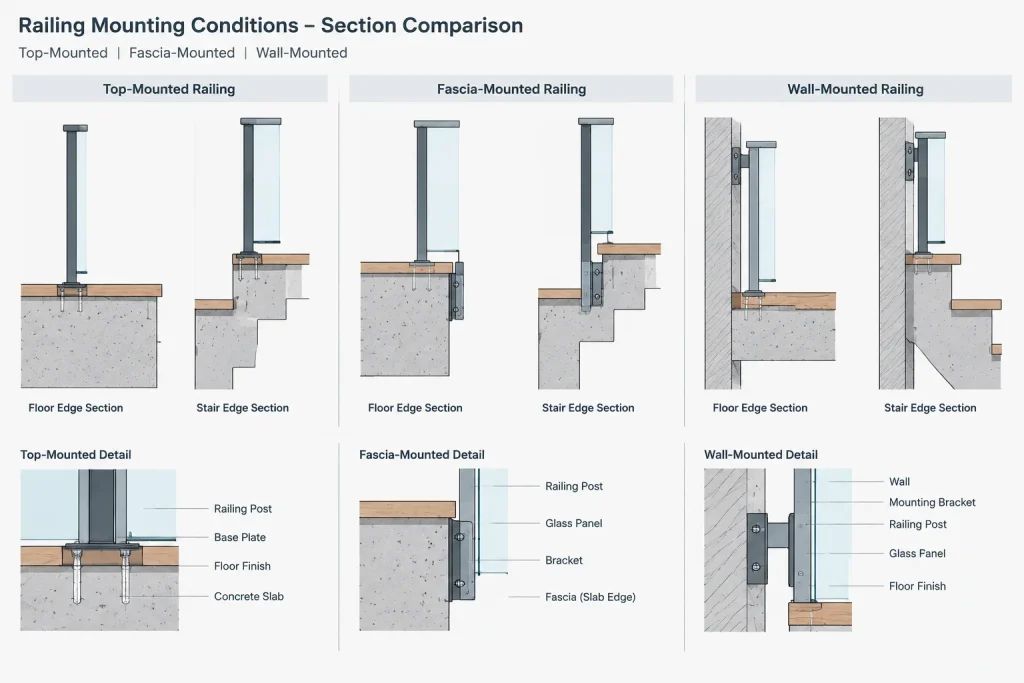
Ask the following questions during drafting:
- Does the handrail remain continuous where continuity is required by the project criteria?
- Does a wall-mounted segment align with a post-supported segment?
- Is the return visible and consistent in plan, elevation, and detail?
- Does the rail end interfere with a door, cabinet, glazing panel, or circulation route?
- Is a guard interrupted by a gate, removable panel, or maintenance opening?
- Does a change in floor finish alter the apparent or actual mounting level?
- Can the proposed support connect to verified structure?
Where geometry is unresolved, use a clearly identified coordination note rather than drawing a plausible but unverified connection.
Manage Repetition Without Hiding Differences
Typical details can reduce drafting effort, but railing conditions are rarely identical throughout a project. Create a condition matrix before assigning details. Group locations by circulation type, edge condition, mounting method, substrate, rail configuration, and finish.
A balcony guard, stair guard, ramp handrail, and wall-mounted corridor handrail may belong to the same visual family while requiring different drawings. Detail references should point to the correct condition rather than to a universal detail that leaves critical interfaces unexplained.
Quality-Control Checklist
- Compare every rail run in plan with its elevation or section.
- Confirm that stairs, ramps, landings, edges, and finish build-ups are current.
- Check corners, returns, extensions, gates, and interrupted segments.
- Review nearby doors, glazing, columns, equipment, and casework.
- Verify that post and bracket symbols have not been mirrored into incorrect configurations.
- Confirm that overhead and hidden components use the intended graphic convention.
- Check detail callouts and sheet references after drawing changes.
- Identify which connections require structural, manufacturer, or fabricator input.
- Plot or publish a test sheet to review lineweight, density, and legibility.
- Do not rely on a downloaded DWG block as evidence of code compliance or constructibility.
A Reliable Drawing Strategy
The most dependable approach is to draft guards and handrails from coordinated building geometry, then develop the assembly across plans, elevations, sections, and details. Reusable blocks can improve consistency, but they should support the workflow rather than replace project-specific review.
When the rail path, supports, transitions, and mounting conditions agree across views, the drawings become easier to read and easier for other disciplines to verify. The final system must still be checked against the project design criteria, applicable regulations, structural requirements, selected products, and fabrication information before construction use.
Use the Rail Path as a Coordination Record
A well-managed rail path can act as a shared reference for plans, elevations, sections, and enlarged details. When the building geometry changes, review the control path before editing individual graphics. This reduces the chance that a revised stair edge, landing, wall finish, or opening will be updated in one view but missed elsewhere.
Do not treat the control path as the complete assembly. It establishes alignment, while posts, brackets, infill, mounting plates, returns, and other components require their own coordinated representation where they affect design or construction.
Separate Design Intent from Fabrication Information
Architectural CAD drawings should clearly describe the intended location, appearance, continuity, interfaces, and significant transitions of the system. Product-specific profiles, connection engineering, anchor selection, and fabrication tolerances may depend on information developed by manufacturers, engineers, or fabricators.
Where responsibility changes between disciplines or project participants, use consistent terminology and clearly identify unresolved interfaces. Avoid filling gaps with generic block geometry that appears complete but has not been verified.
Review the Assembly by Condition, Not Only by Sheet
A sheet-by-sheet check may miss disagreements between related views. A stronger review method follows each railing condition through the drawing set. Start at its plan location, find the corresponding elevation or section, inspect the mounting detail, and confirm that notes and references describe the same assembly.
This condition-based review is especially useful at:
- Changes between sloped and level rails
- Connections between wall-mounted and post-supported segments
- Corners, returns, gates, and interrupted guards
- Interfaces with finish build-ups and waterproofed edges
- Locations near doors, glazing, casework, or equipment
- Areas where structural support remains under coordination
Prepare CAD Geometry for Future Revisions
Keep repeated components consistent, but avoid combining unrelated conditions into a block that is difficult to audit. Use logical insertion points, predictable orientation, and component-based layer control. Continuous geometry should remain easy to stretch, trim, and compare with updated backgrounds.
Before issuing drawings, remove abandoned construction lines, check for duplicated objects, review mirrored symbols, and confirm that hidden or overhead graphics communicate actual view relationships. A clean file supports both visual quality control and later project revisions.
Frequently Asked Questions
Should a guard and a handrail be drawn as the same CAD object?
Not automatically. They may be part of one assembly, but they perform different functions and may have different paths, profiles, elevations, supports, or terminations. Separate geometry often makes coordination clearer.
When is a simple rail centerline appropriate?
A centerline can communicate general alignment in a small-scale plan. Enlarged plans, sections, and details should show additional component geometry when rail width, mounting, supports, or adjacent clearances affect the design.
Should railing geometry be created as blocks or polylines?
Use blocks for tested, repeated components such as posts, brackets, or symbols. Polylines and purpose-built geometry are often more practical for continuous runs, slopes, corners, and project-specific transitions. A combination usually provides better editing control.
How should rail conflicts be checked in CAD?
Compare the assembly with current stair, ramp, landing, edge, wall, finish, door, glazing, casework, and structural backgrounds. Review the same condition in plan, elevation, and section rather than relying on a single view.
Can a downloaded railing DWG be used as a construction detail?
A downloaded file can provide a drafting reference or starting point, but it should not be assumed to represent project requirements, verified products, compliant geometry, structural connections, or fabrication information. Adapt and verify it through the project coordination process.
What should be done when a connection has not been resolved?
Show the known design intent and identify the interface as requiring coordination. Do not draw an apparently complete anchor, plate, or support arrangement unless it is supported by verified project information.