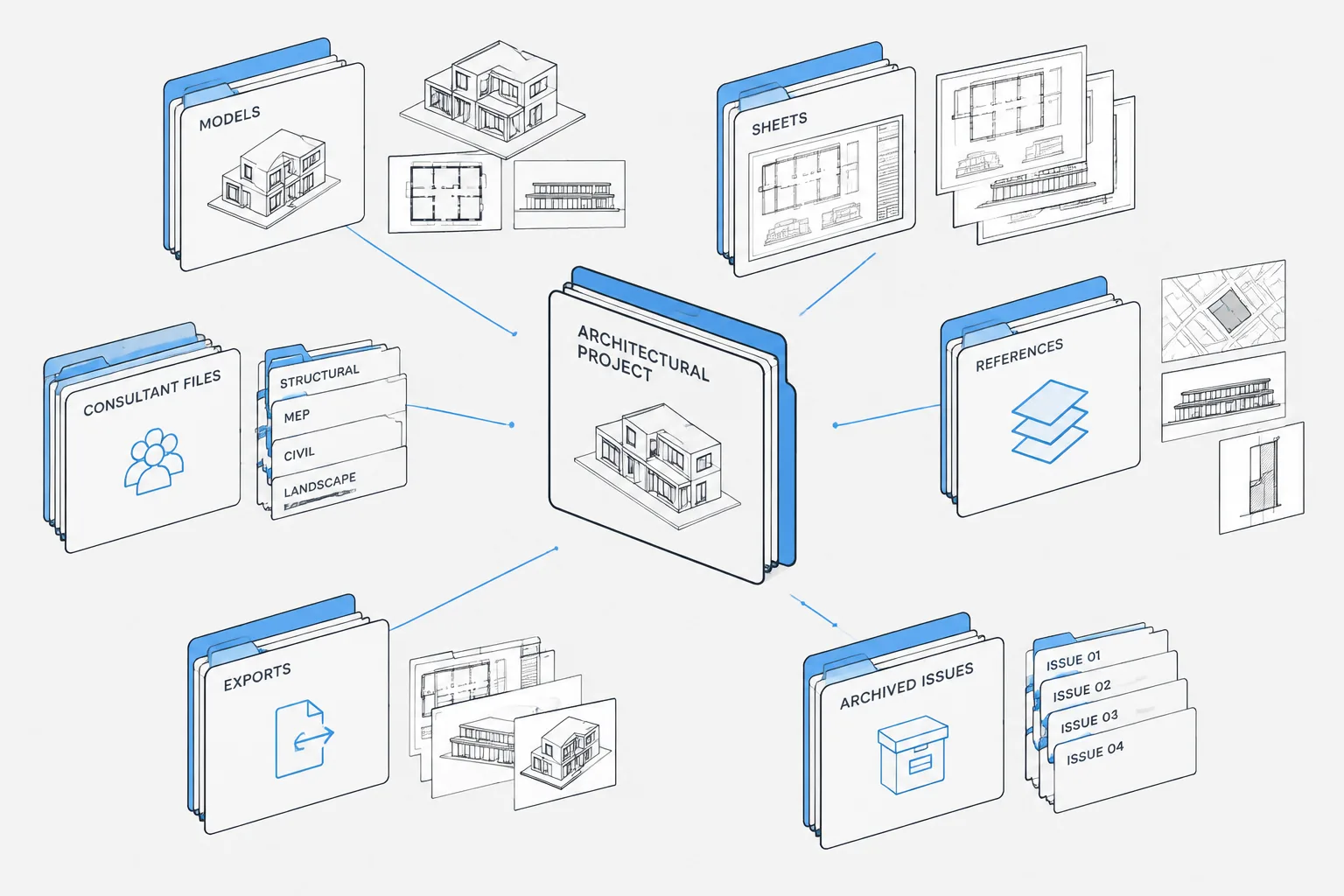
Architectural CAD file naming is a coordination tool, not merely an administrative task. A clear naming convention helps users recognize what a DWG contains, who is responsible for it, where it belongs, and whether it is active production information, an external reference, or a published record.
This guide explains how to connect file identity, folder location, Xref management, consultant information, sheet organization, and issue control. The recommendations are intended as a practical framework and should be aligned with the project execution plan, client requirements, consultant agreements, and established office procedures.
A well-organized CAD project should tell users where a drawing belongs before they open it. File names should identify the drawing’s role, while folders should separate active work from references, issued files, and temporary exports. When these systems are unclear, teams may attach the wrong background, edit an outdated plan, overwrite a consultant file, or issue a drawing from the wrong location.
There is no single naming convention that fits every architectural practice. Project size, consultant requirements, client standards, and office procedures all affect the final system. The goal is not to create the longest possible file name. It is to establish a concise structure that remains understandable throughout design, documentation, coordination, and archiving.
Start by Separating File Identity from Drawing Content
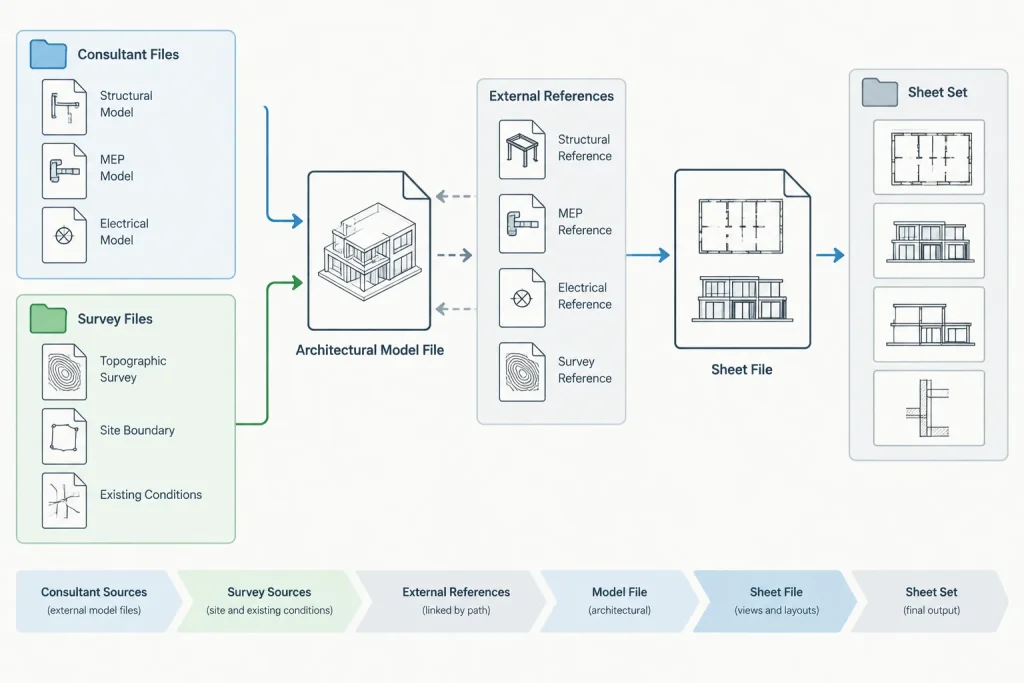
A DWG file and a plotted drawing are not always the same thing. One model file may contain the geometry used by several sheet files, while one sheet file may reference multiple models. Treating every DWG as if it were a self-contained printed sheet can make a larger project difficult to manage.
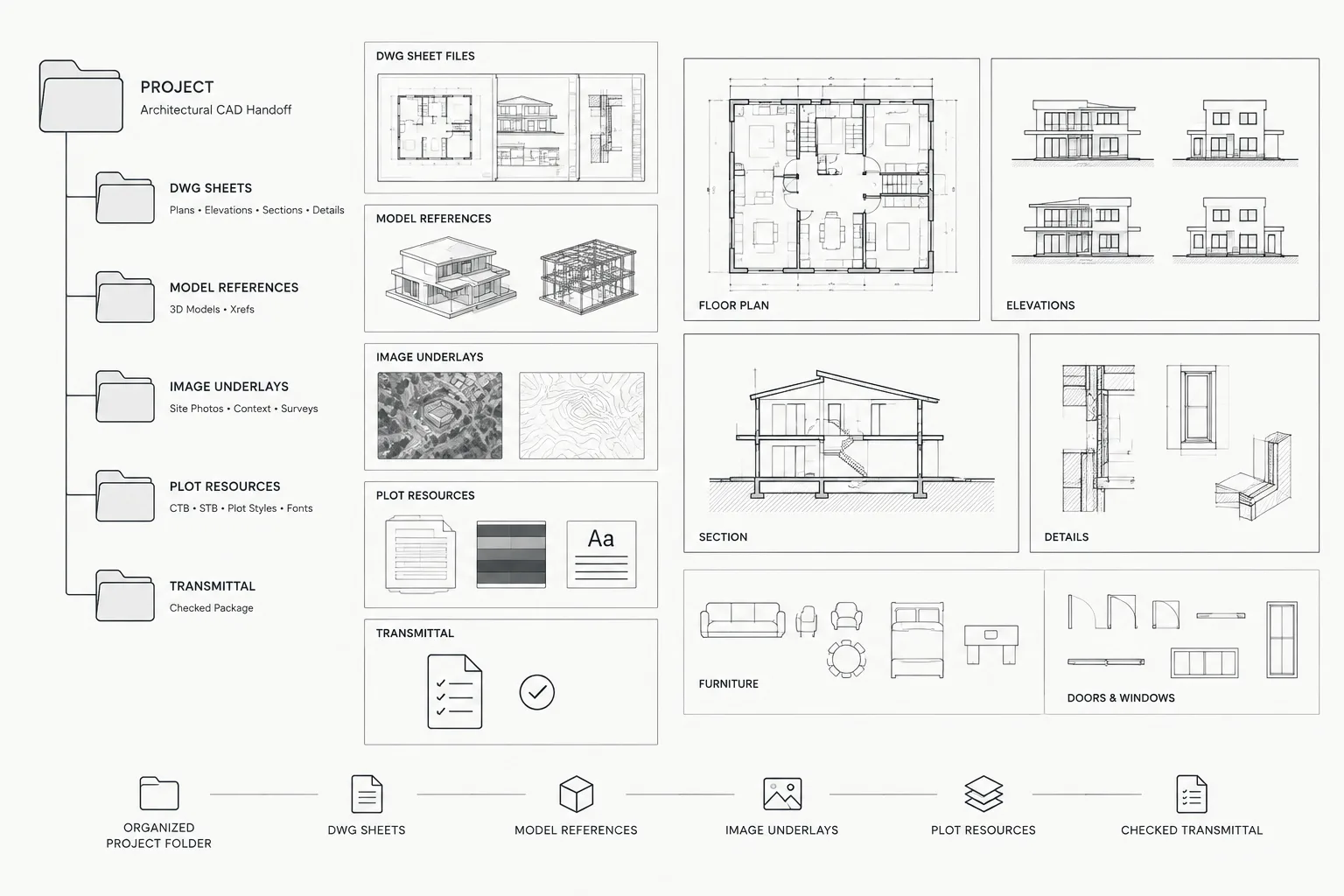
Before choosing file names, define the primary file roles used by the project:
- Model files: Plans, elevations, sections, site information, reflected ceiling information, or other project geometry.
- Sheet files: Paper-space layouts, title blocks, viewports, sheet notes, and drawing-specific annotation.
- Reference files: Surveys, consultant backgrounds, existing-condition drawings, and other information received from outside the active architectural model set.
- Support files: Images, spreadsheets, underlays, fonts, plot settings, and other files required to reproduce the drawings.
- Exports and issue files: PDFs, transmitted DWGs, and other deliverables created for a particular review or issue.
These categories do not require separate files in every project. A small drawing may combine model geometry and sheet layouts successfully. The important step is to decide which approach is being used and apply it consistently.
Build File Names from Stable Information
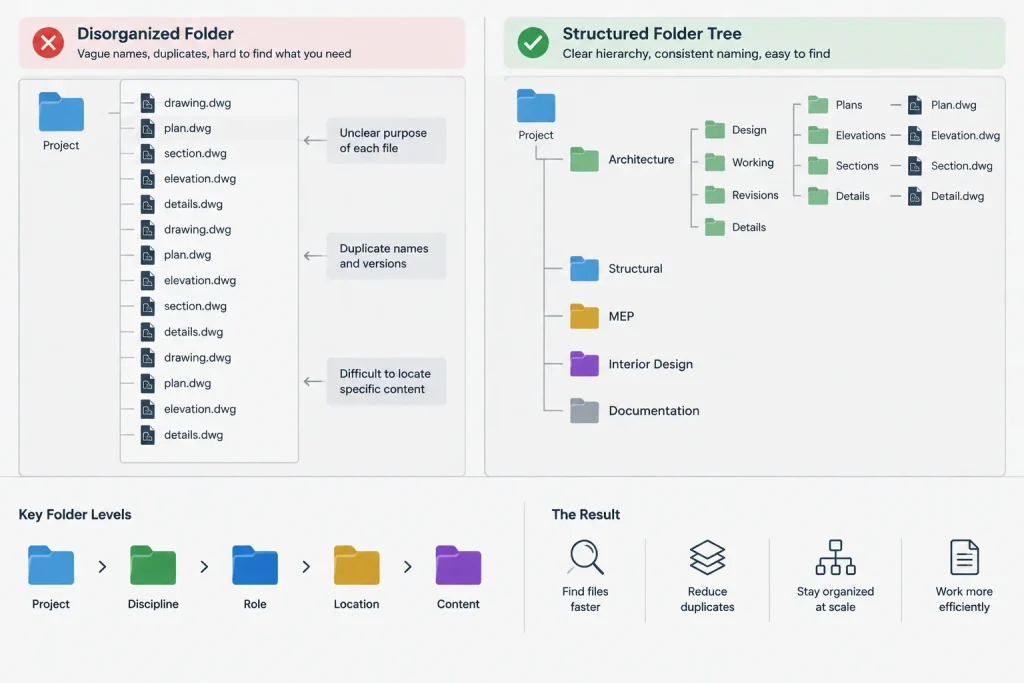
Useful file names are based on information that is unlikely to change every day. A practical name may combine a project identifier, discipline, drawing role, area, level, or view type. The exact order matters less than consistent use across the project.
| File-name component | Purpose | Practical guidance |
|---|---|---|
| Project identifier | Separates files from different projects | Use the office’s established project reference rather than an informal nickname. |
| Discipline | Identifies the drawing author or subject | Agree on abbreviations with the project team and avoid creating multiple abbreviations for the same discipline. |
| File role | Distinguishes models, sheets, references, or details | Choose role labels that remain clear outside the author’s workstation. |
| Area or level | Locates the drawing within the building or site | Use the same area and level terminology found in the drawing set. |
| View or content type | Describes plans, ceilings, elevations, sections, or details | Avoid vague labels such as miscellaneous, latest, or working. |
A conceptual pattern might read as project-discipline-role-location-content. This is a framework rather than a mandatory standard. Teams should remove components that add no useful distinction and retain those needed to prevent ambiguity.
Avoid Status Words That Quickly Become Misleading
Words such as final, current, latest, revised, and new are unreliable because their meaning changes. A file called final may receive another revision, and several users may create separate files called latest. Status should instead be controlled through the approved project location, revision process, issue record, and file metadata where applicable.
Personal initials can be useful in a temporary work area, but they should not become the primary identity of a shared production file. Likewise, dates should not be appended repeatedly to the active model name. Doing so changes reference paths and can leave sheets attached to obsolete copies.
Create a Folder Structure Around Project Activities
A folder tree works best when it reflects how information moves through the project. Users should be able to distinguish active production information from received references and issued deliverables without opening files to investigate them.
A practical top-level structure may include:
- CAD production: Active architectural models, sheets, Xrefs, and project-specific CAD support files.
- Consultant information: Original files received from structural, civil, landscape, and building-systems consultants.
- Reference information: Surveys, client backgrounds, record drawings, images, and other source material.
- Published issues: Locked copies of files issued for review, coordination, pricing, permitting, or construction purposes.
- Exports: Temporary PDFs, data exports, and exchange files awaiting review or transmission.
- Archive: Superseded milestones or formal project snapshots retained according to office policy.
Do not create more folder levels than the team can reliably navigate. Deep folder trees make paths harder to read and can encourage users to save files on desktops or in unofficial shortcuts. A shallower structure with clearly named folders is often more effective than a complex hierarchy.
Keep External References Predictable
External references are especially sensitive to file organization. Moving or renaming an active reference without coordination can affect every drawing that uses it. Establish where architectural models, consultant backgrounds, and shared base files will live before extensive sheet setup begins.
When practical, use relative reference paths so a coordinated project folder can be moved or packaged without depending on one user’s drive mapping. Path behavior should still be tested in the actual project environment because shared drives, cloud-synced locations, and document-management systems may handle locations differently.
Avoid editing consultant files directly in their received folder. Preserve the original delivery, then follow the office’s documented process for cleaning, renaming, or preparing a working reference. This creates a traceable distinction between what was received and what the architectural team used.
Do Not Hide Reference Identity
A renamed reference should still indicate its source and purpose. Generic names such as background.dwg or base.dwg become confusing when several disciplines provide files. The architectural team should be able to identify the consultant, drawing type, and relevant building area without loading the reference.
Distinguish Active Files from Published Issues
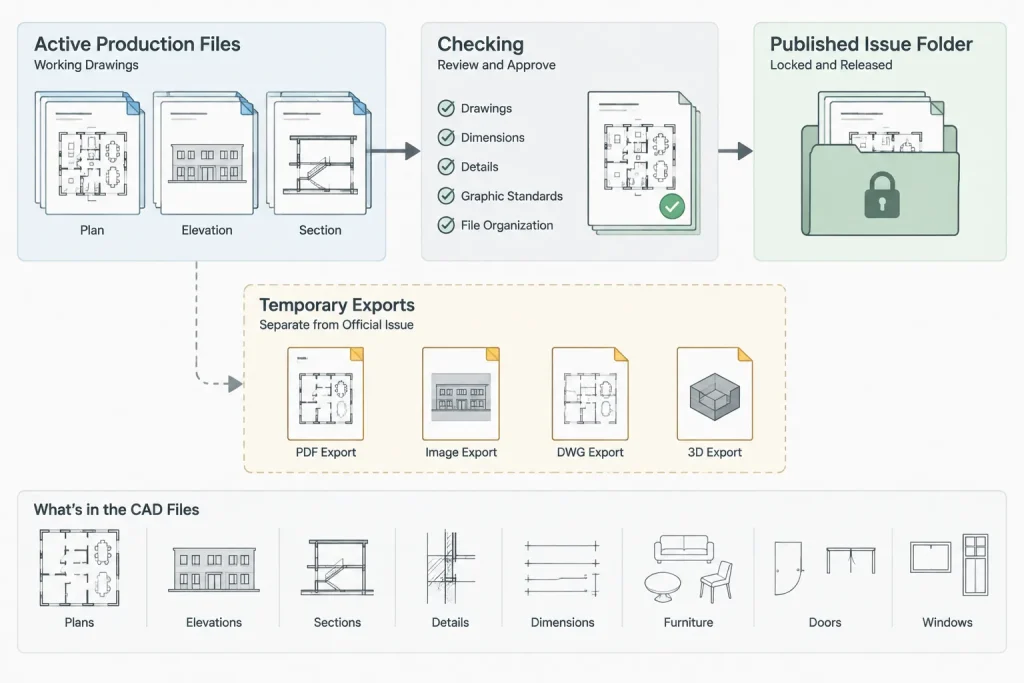
An issue folder should be a record, not an alternate production area. Copy approved deliverables into a clearly identified issue location and prevent routine editing there according to office practice. Continue production in the active project folders.
Each issue should include enough context to determine what was transmitted. Depending on the agreed deliverable, that may include plotted sheets, transmitted DWGs, required reference files, and a drawing register or transmittal prepared through the project’s normal process. Never assume that copying the visible host drawing alone creates a complete DWG package.
Temporary plotting files should not be mixed with formal issues. If an export is created for internal checking, keep it in a temporary or review location until it is accepted for release.
Coordinate Names with Sheet Numbers and Drawing Titles
A sheet DWG name may reflect its sheet number, but the file name should not become the only source of sheet information. The title block, drawing index, layout name, and published output must still agree.
For model files, avoid forcing sheet numbers into names when the model serves multiple sheets. A floor-plan model may support an overall plan, enlarged plans, coordination backgrounds, and presentation views. Naming it after one plotted sheet can obscure its broader role.
Use the same terminology across file names, drawing titles, area labels, levels, and project directories. If one part of the project uses east wing while another uses area B for the same location, users must translate between two systems and are more likely to attach or issue the wrong information.
Apply a Controlled Renaming Process
Renaming a referenced DWG is not a casual housekeeping task. Before changing a shared file name, identify which drawings attach it and determine how paths will be updated. Coordinate the change with other users so they do not continue working from the previous name.
A controlled renaming workflow should include:
- Confirming why the existing name is inadequate.
- Checking whether the file is referenced by sheets, models, details, or consultant coordination files.
- Choosing a replacement name that follows the project convention.
- Updating affected references in a coordinated session.
- Opening representative sheets and checking that references load correctly.
- Removing or archiving the obsolete copy so both names do not remain active.
- Recording the change where the project’s coordination process requires it.
Review the Structure at Project Milestones
File organization can drift as new areas, consultants, and deliverables are added. Review the system at major milestones rather than waiting until project closeout. Look for duplicate active models, broken references, vague file names, personal working copies in shared folders, and issue files stored with production drawings.
A useful review also asks whether a new team member can understand the project without relying on verbal explanations. If file names only make sense to their original author, the system is not yet doing its job.
Practical File Organization Checklist
- Define model, sheet, reference, support, export, and issue file roles.
- Use one agreed sequence of file-name components.
- Keep project, discipline, level, and area terminology consistent.
- Avoid final, latest, and similar status words in active file names.
- Preserve original consultant deliveries separately from working references.
- Test reference paths after moving, packaging, or renaming files.
- Keep published issues separate from active production work.
- Verify that sheet files, title blocks, drawing indexes, and outputs agree.
- Archive obsolete duplicates instead of leaving several apparent master files.
- Document project-specific exceptions so every contributor follows the same method.
Effective architectural CAD file naming is less about finding a universal code and more about creating dependable project relationships. A concise name identifies the file, a logical folder identifies its status, and a controlled reference workflow connects it to the rest of the drawing set. Together, these practices reduce searching, protect issue records, and make DWG projects easier to coordinate and hand over.
Turning the Workflow into a Project Protocol
A naming and folder system becomes useful only when the project team applies it consistently. Record the agreed terminology in a short project protocol that contributors can consult before creating, receiving, renaming, or publishing files. The protocol should describe file roles, approved abbreviations, folder purposes, reference locations, and the method used to preserve issued information.
Test the System with Typical Tasks
Before the drawing set becomes complex, walk through common project actions. Confirm that a user can locate an active architectural model, identify a consultant background, open a sheet with its expected references, find the support files needed for plotting, and distinguish an internal export from a published issue. If any task requires guesswork, revise the terminology or folder arrangement while the change is still manageable.
Assign Responsibility for Shared Information
Shared files need an understood owner. Responsibility may follow discipline, drawing role, or office procedure, but users should know who may rename a file, replace a consultant background, update a shared base, or place deliverables in an issue folder. Clear ownership reduces competing copies and uncoordinated path changes.
Use Folder Location as Part of File Status
A file name describes identity, while its approved location helps communicate status. The same DWG should not appear to be active in several shared locations. When a file is superseded, archive or remove the obsolete working copy according to office policy rather than relying on users to recognize it from memory.
Prepare for Handover and Recovery
A well-structured project should remain understandable when the original author is unavailable. Before handover or archiving, review reference dependencies, remove misleading duplicates, preserve required support information, and confirm that published records are separated from editable production files. The receiving user should be able to understand the project structure without reconstructing undocumented personal workflows.
Questions for a Project Organization Review
- Can users identify a file’s role without opening the DWG?
- Do model, sheet, reference, support, export, issue, and archive locations have distinct purposes?
- Are project areas, levels, disciplines, and drawing types described with consistent terminology?
- Are original consultant deliveries preserved separately from prepared working references?
- Can the team identify which location contains the current production file?
- Do representative sheets load the intended references after a move or rename?
- Are published deliverables protected from routine production editing?
- Can a new contributor understand exceptions from written project guidance?
Architectural CAD File Naming FAQ
Should every DWG name match a sheet number?
No. A sheet file may use a name related to its sheet identity, but a model can support several sheets and views. Model names should describe the model’s broader content and role rather than tie it unnecessarily to one plotted sheet.
Should revision status be added to the active file name?
Repeatedly changing the active DWG name can disrupt reference paths and create competing copies. Revision and issue status are generally clearer when managed through the approved project location, title block information, issue records, and the office’s documented process.
Where should consultant DWG files be stored?
Keep original consultant deliveries in a clearly identified received-information location. If the architectural team prepares a cleaned or renamed working reference, preserve a traceable distinction between the received source and the file used for coordination.
Why are generic Xref names a problem?
Names such as base or background do not reveal the source, discipline, content, or relevant project area. Descriptive reference names help users choose the intended file and investigate missing or outdated attachments without loading every candidate.
What is the difference between an export folder and an issue folder?
An export folder can hold temporary output awaiting checking or transmission. An issue folder should preserve the approved deliverables associated with a formal release and should not become an alternate production workspace.
When should a CAD folder structure be reviewed?
Review it when project scope, areas, consultants, deliverables, or coordination methods change, as well as at established project milestones. The purpose is to identify drift before duplicate files, unclear status, or broken references affect the drawing set.