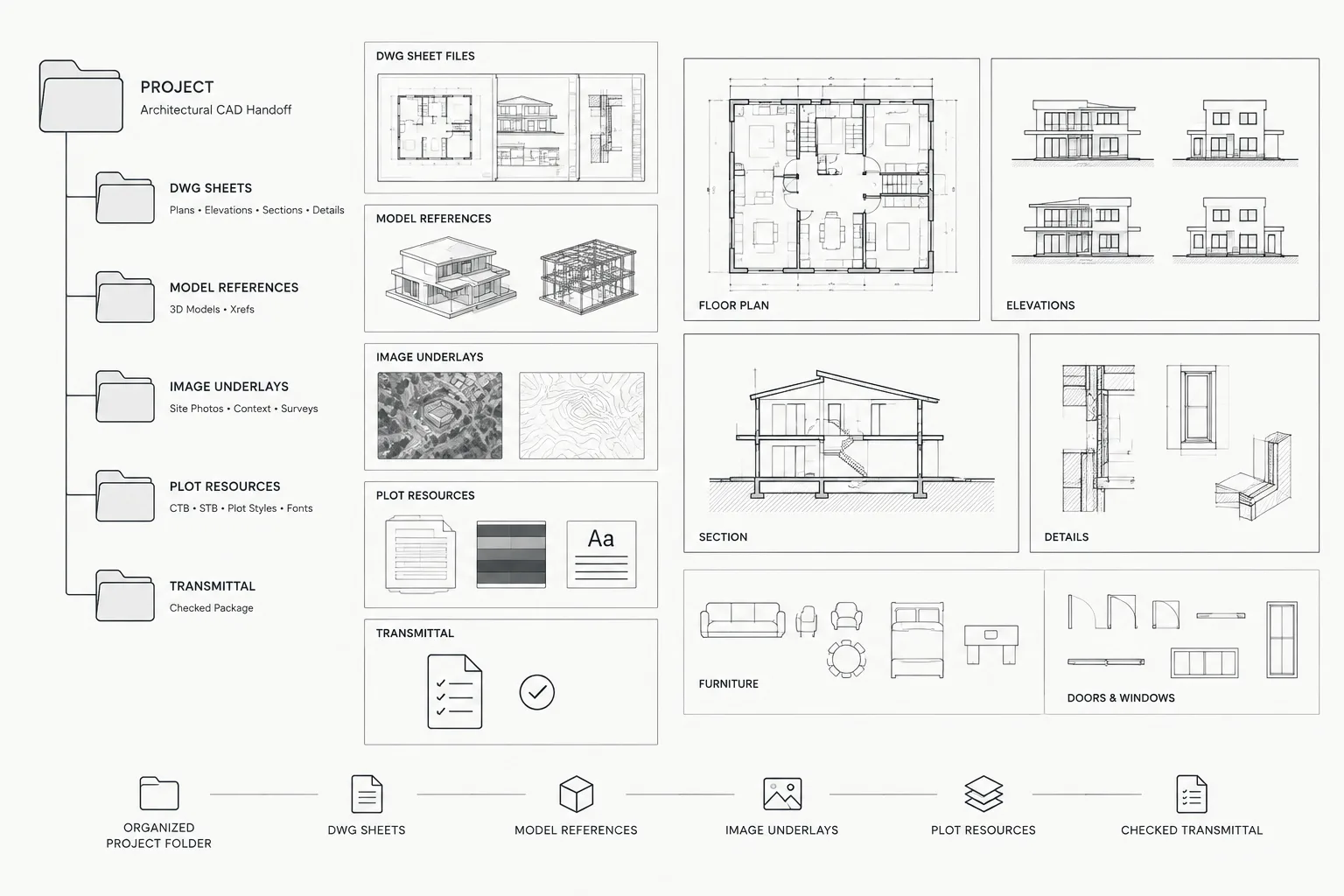
Packaging architectural drawings is a deliverable-control task, not merely a file-copying exercise. A dependable package must preserve the relationships among host drawings, external references, display resources, sheet layouts, and supporting documentation after the files leave their original project environment.
The workflow below explains how to package architectural DWG files for coordination, formal handoff, or archiving while reducing missing-reference problems and avoiding unnecessary changes to the issued drawings.
A DWG file that opens correctly on the author’s computer may arrive incomplete on someone else’s system. External references can be missing, custom fonts may be substituted, image underlays may disappear, and plot settings may not travel with the drawing. These problems are especially common when files are sent to consultants, contractors, clients, or long-term archives.
A reliable handoff is more than copying drawing files into a folder. It is a controlled process of identifying dependencies, cleaning unnecessary data, documenting the drawing environment, and testing the package from a location that does not rely on the original project paths.
Define the purpose of the DWG package
Start by determining what the recipient needs to do with the files. A consultant who will reference architectural backgrounds has different requirements from a client receiving record documents or an internal team creating an archive.
- Coordination package: Editable model files prepared for use as consultant backgrounds.
- Sheet package: Drawings organized around the issued sheets, including layouts and required references.
- Record archive: A preserved project snapshot containing issued files and supporting resources.
- Limited extract: Only the agreed portion of the project, such as a floor plan, reflected ceiling plan, or site background.
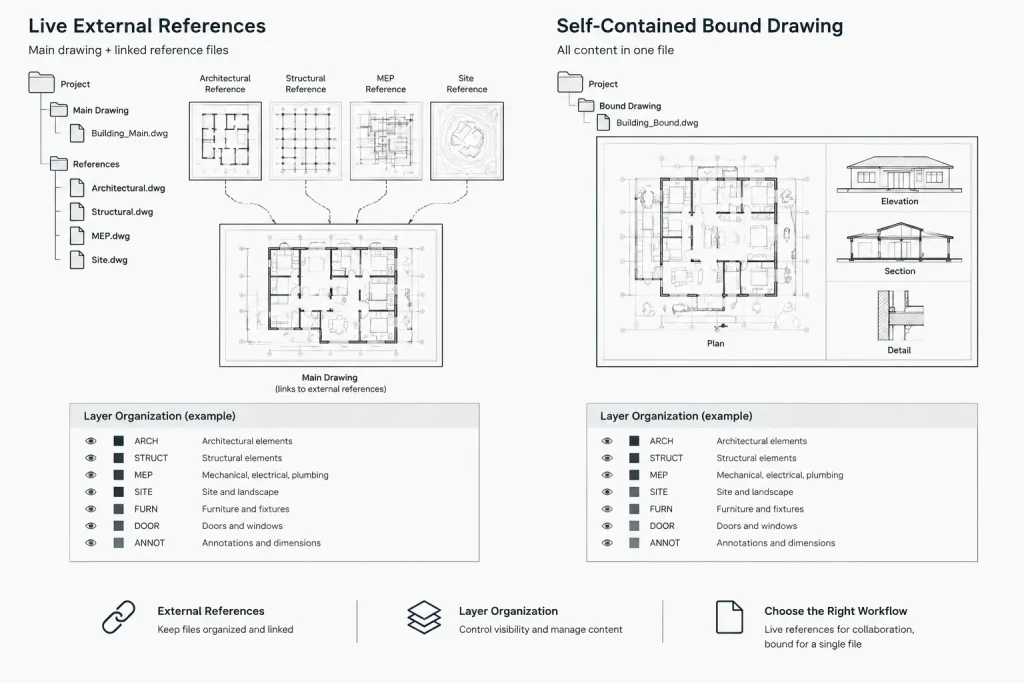
Confirm whether the recipient expects live external references, self-contained files, plotted sheets, or a combination of formats. Do not bind, flatten, or restructure files merely because it seems convenient. Those actions can reduce editability and make later coordination more difficult.
Freeze the issue set before packaging
Create the handoff from a controlled project state rather than from files that are still being edited. Make sure the intended drawings have been saved and that the package corresponds to the correct issue or coordination milestone.
Keep the outgoing package separate from the active working directory. This prevents packaging work from changing production files and provides a stable snapshot of what was actually transmitted. Folder names can identify the project, package purpose, and issue status without depending on ambiguous labels such as “latest” or “final final.”
Inventory every drawing dependency
Architectural DWG files can depend on resources stored outside the main drawing. Review each deliverable for attached or referenced content before it leaves the office environment.
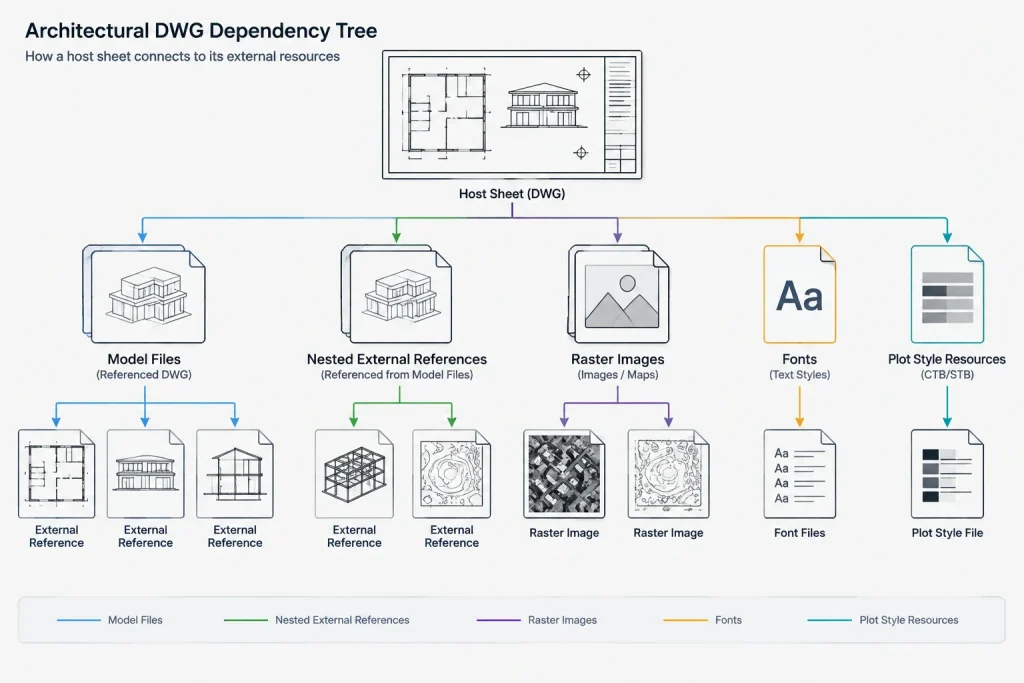
- DWG external references, including nested references
- Raster images used for surveys, context, signage, or presentation
- PDF or other supported underlays
- Custom text fonts and shape files
- Plot style files used by the sheet setup
- Referenced spreadsheets or data links
- Custom linetypes that rely on external shape definitions
- Project-specific symbols, logos, and title block resources
Do not assume that a reference is unnecessary because it is visually subtle. A missing file may contain a title block, survey base, key plan, consultant background, or other information essential to interpreting the drawing.
Review nested references
A host drawing may appear to reference only one architectural model while that model depends on several additional files. Inspect the full reference hierarchy and resolve unloaded, not-found, or incorrectly pathed items. Confirm that nested references are intentionally included rather than accidental remnants from earlier coordination.
Choose a reference strategy
The safest strategy depends on the handoff purpose. Live references generally preserve the project structure, while bound files can be easier to transport but may alter layers, block organization, and future editing behavior.
| Strategy | Useful when | Key concern |
|---|---|---|
| Preserve external references | The recipient will coordinate or update linked models | All reference files and usable paths must be included |
| Bind selected references | A self-contained file is specifically requested | Layer names and block definitions may change |
| Provide both versions | The agreement calls for editable backgrounds and a fixed snapshot | Versions must be labeled clearly to prevent confusion |
| Detach nonessential references | Internal working aids should not be transmitted | Detaching content can change the visible or plotted result |
Always retain an untouched project copy before binding or detaching references. Open and inspect any bound result because naming conflicts, clipped references, and display order can produce unexpected changes.
Use portable file paths and a clear folder structure
Absolute paths tied to a particular workstation or server are likely to fail outside the originating office. Relative paths are generally more portable when the package maintains a predictable relationship between host drawings and referenced files.
A practical package can separate sheet files, model files, references, images, plot resources, and supporting documents. Avoid deeply nested folders and unexplained abbreviations. The recipient should be able to understand the structure without reconstructing the author’s internal network.
Be careful when files with identical names come from different source folders. Placing them in a single directory can overwrite content or cause a drawing to load the wrong reference. Rename only through a controlled process, and update the affected reference paths before testing.
Clean the drawings without damaging project data
Remove obvious temporary content such as abandoned test geometry, off-site markups, unused scratch layouts, and unintended objects far from the project. Review unused layers, blocks, linetypes, and annotation resources, but do not treat automated cleanup as a substitute for visual inspection.
Some apparently unused definitions may support scripts, future phases, office standards, or dynamic block behavior. Work on package copies and compare the cleaned files with the issued set. Drawing repair and cleanup tools can help identify database problems, but every resulting file should still be opened, regenerated, and reviewed.
Protect sensitive and irrelevant information
Coordination files may contain more information than the recipient needs. Check frozen layers, nonplotting notes, hidden layouts, embedded paths, old options, internal comments, and referenced content outside the agreed scope.
Remove information only when contract requirements and project procedures allow it. A handoff should not silently omit information needed to understand the design. When content is intentionally excluded, explain the limitation in the transmittal documentation.
Include plot and display resources
If plotted appearance matters, include the applicable plot style resources and identify whether the drawings use color-dependent or named plot styles. Confirm page setups, sheet sizes, viewport scales, lineweights, and output devices without assuming the recipient has the same printer configuration.
Custom fonts require special care. Confirm that they may legally be distributed. When they cannot be included, document the font dependency and consider providing a fixed-format reference set so the intended text appearance remains visible.
Add a concise package readme
A simple readme or transmittal note can prevent many questions. It should state what the package contains, its purpose, the drawing units, the expected reference structure, the plot style method, and any excluded or unresolved items.
Also identify the primary host files. A folder containing many similarly named DWGs is difficult to navigate if the recipient cannot distinguish sheet files from model backgrounds or obsolete alternates.
Test the package independently
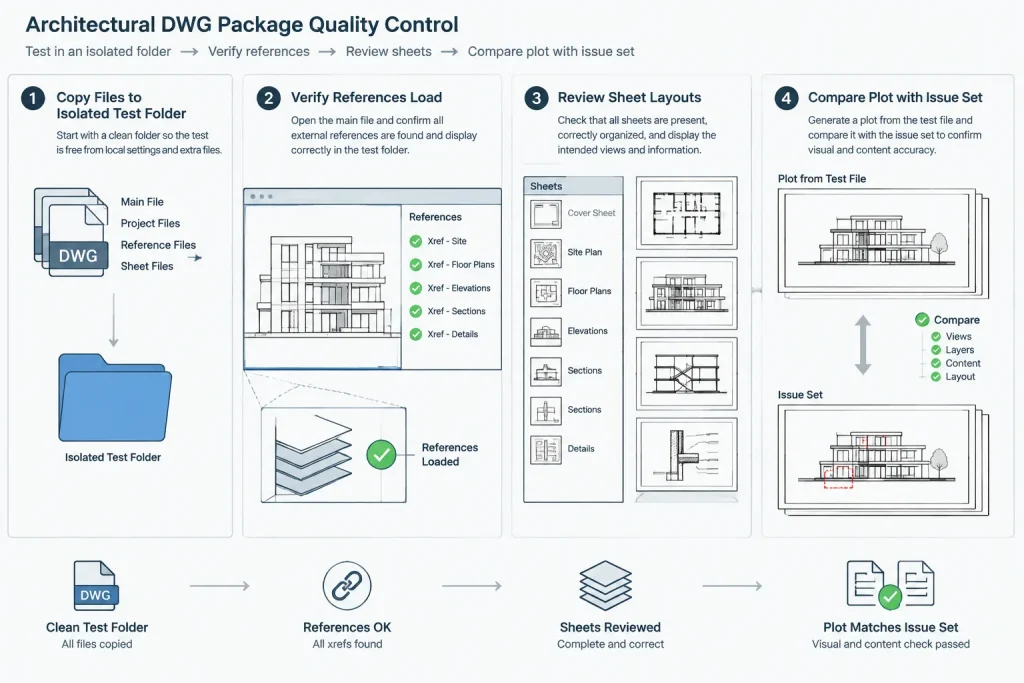
The most important quality-control step is to test the package outside its original environment. Copy it to a temporary location that cannot access the normal project folders, then open the primary drawings from that copy.
- Confirm that required references load from within the package.
- Check for missing fonts, images, underlays, or data links.
- Review model space and every delivered paper-space layout.
- Regenerate the drawings and inspect extents for stray objects.
- Plot representative sheets using the packaged resources.
- Compare the result with the approved issue output.
- Verify that file names and revision information match the transmittal.
If a drawing succeeds only because the workstation can still reach the project server, the test has not proved portability.
Archive the transmitted package as sent
Preserve an exact copy of the outgoing package together with its transmittal record. Do not continue editing this archived copy after delivery. If corrections are needed, create and identify a replacement package according to the project’s revision procedure.
A good DWG handoff allows another person to open, understand, reference, and plot the intended drawings without access to the author’s workstation. Clear scope, complete dependencies, portable paths, independent testing, and simple documentation are more valuable than an oversized folder containing every project file.
A practical acceptance framework for DWG packages
A package can be considered ready for delivery when another CAD user can identify its purpose, locate the authoritative drawings, understand the reference structure, and reproduce the intended content without relying on undocumented office knowledge.
- Scope: The included drawings match the agreed handoff purpose, and intentional exclusions are documented.
- Dependencies: Required references and supporting resources are present, correctly pathed, and distinguishable from optional working material.
- Appearance: Delivered layouts can be reviewed against the approved issue output so that font, lineweight, image, and plotting differences are visible.
- Portability: The drawings work from the package location rather than silently resolving files from the author’s server or workstation.
- Traceability: File names, issue information, package notes, and the transmittal record describe what was actually sent.
Separate package validation from design approval
Successful package testing confirms that the files are complete and portable; it does not establish that the architectural design, coordination, or code review is complete. Keep those review decisions separate so a technically functional package is not mistaken for an approval of its contents.
Preserve the delivered snapshot
The archived package should represent the transmitted state, while later editing should occur in a separate working copy. This distinction helps teams reconstruct what was delivered and prevents later changes from being confused with the original handoff.
Frequently asked questions about DWG handoff packages
Can I send only the DWG files?
Only when the drawings have no required external dependencies or when exclusions have been explicitly agreed and documented. Referenced drawings, images, underlays, fonts, plot resources, and data links may all affect what the recipient sees or plots.
Should external references always be bound?
No. Binding may be appropriate when a self-contained drawing is specifically requested, but it can change layer names, block organization, and editing behavior. Live references are often more useful for ongoing coordination when the complete reference structure can be delivered.
Are relative paths enough to make a package portable?
Relative paths help, but they do not prove completeness. Every required dependency must also be included in the expected folder relationship, and the package must be tested where the original project paths are unavailable.
What is the difference between a handoff package and an archive?
A handoff package is organized for a recipient’s intended use, such as coordination or sheet review. An archive preserves the transmitted project state and its supporting record. The same files may appear in both, but their purpose and handling are different.
Why provide a fixed-format reference set with editable DWGs?
A fixed-format reference can help the recipient compare the editable drawings with the intended issued appearance. It is especially useful for identifying substituted fonts, missing images, plot-style differences, or altered display results.
How can I tell whether the package is complete?
Open the copied package from a location that cannot access the normal project directories. Review the delivered models and layouts, inspect reference status, and compare representative output with the approved issue set.