Binding xrefs in AutoCAD is best treated as a deliberate file-delivery decision rather than routine drawing cleanup. The choice affects how referenced geometry, layers, blocks, styles, and other named definitions are carried into an architectural DWG.
This guide explains the practical difference between Bind and Insert, when a consolidated drawing may be useful, and how to check the result without disrupting the coordinated project files. The key principle is to preserve the live xref-based workflow while creating and testing any bound deliverable separately.
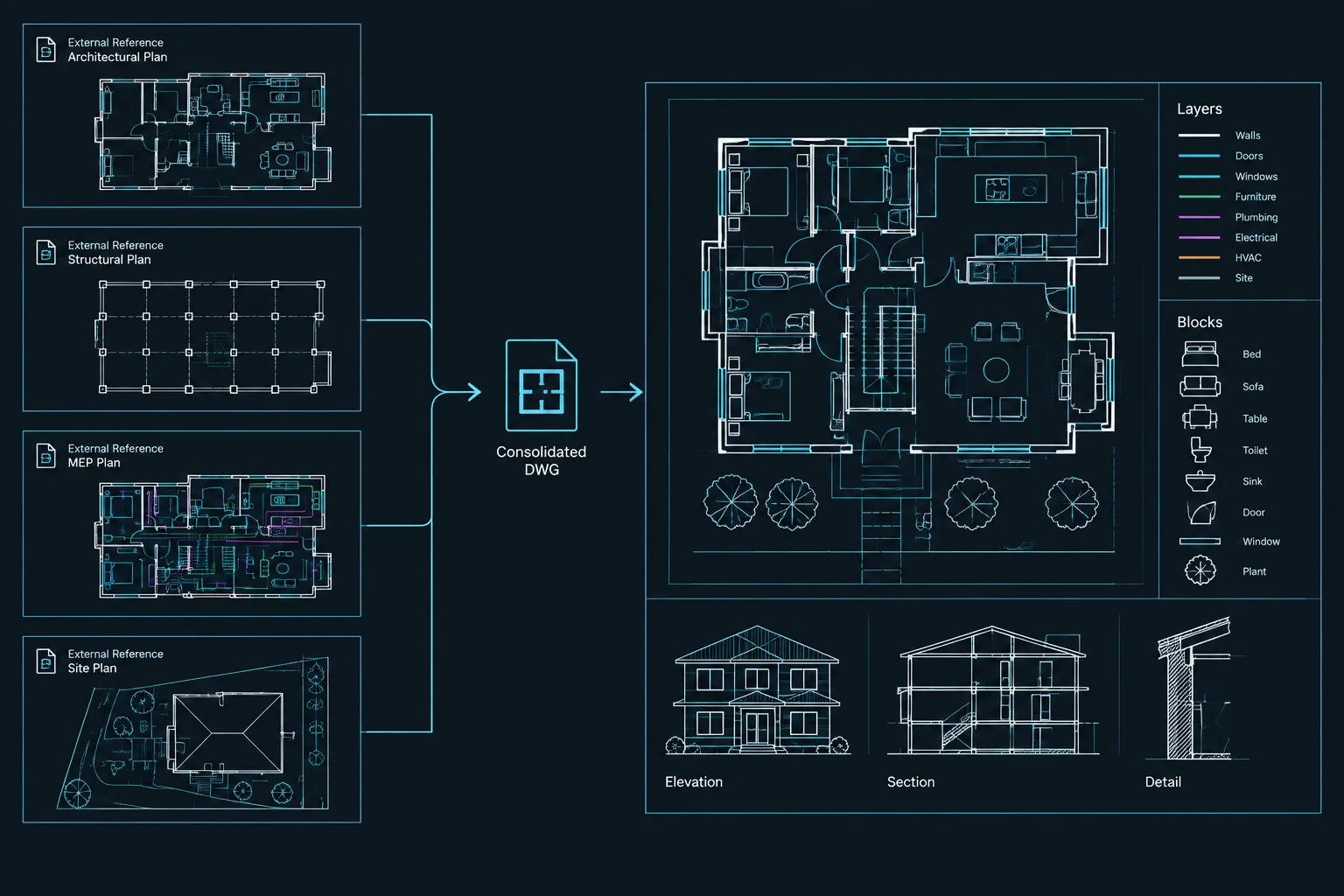
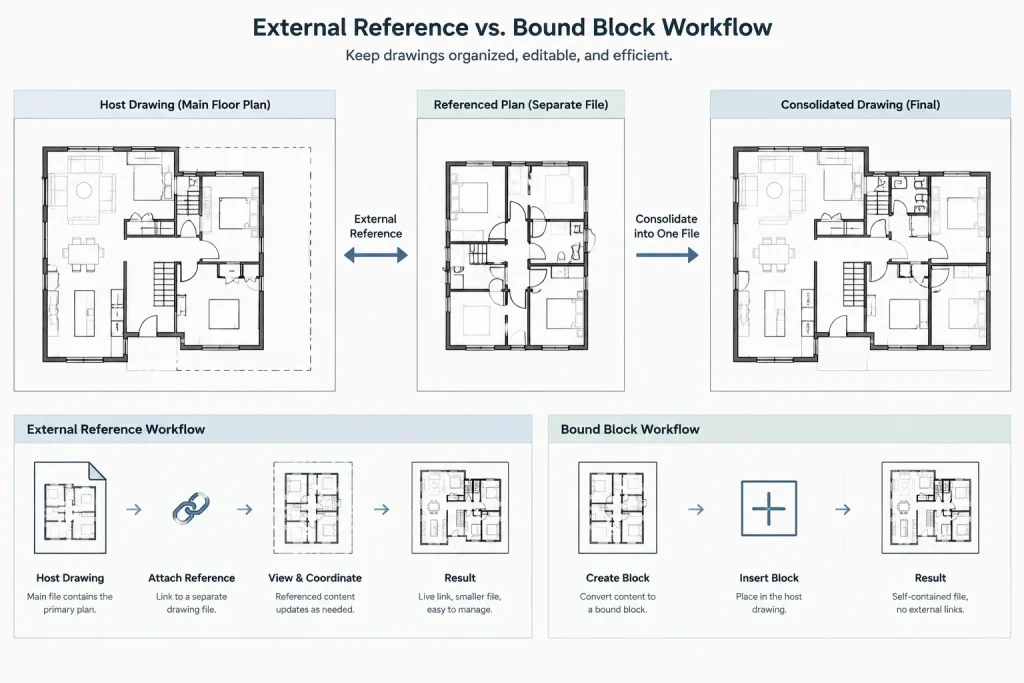
Binding xrefs in AutoCAD converts externally referenced DWG content into content stored inside the current drawing. It can be useful when creating an archive, delivering a self-contained file, or preserving a project milestone. It can also create layer-name conflicts, duplicate definitions, and confusing blocks if it is done without preparation.
For most active architectural projects, keeping floor plans, backgrounds, and consultant drawings as external references is the more maintainable approach. Binding is usually a controlled end-of-workflow operation performed on a copy—not a routine substitute for proper xref management.
What happens when an xref is bound?
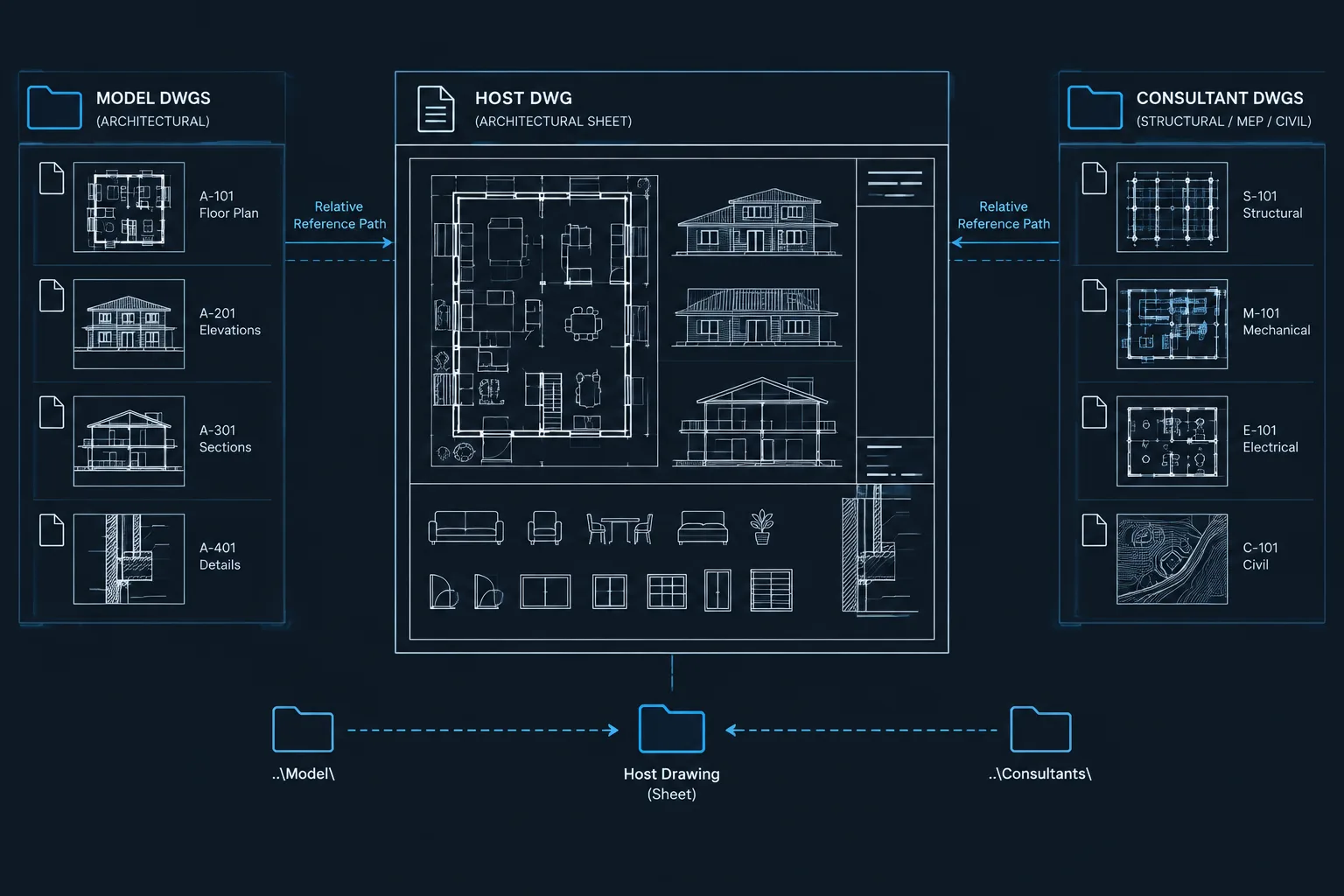
An attached DWG normally remains a separate file. The host drawing stores a reference to that file and displays its geometry according to the reference settings. When the xref is bound, AutoCAD brings the referenced drawing definitions into the host and converts the reference into a block reference.
The resulting drawing no longer needs that particular external DWG to display the bound content. However, binding does not automatically make the file clean, coordinated, or ready for delivery. The host may inherit many layers, linetypes, text styles, dimension styles, block definitions, and other named objects from the reference.
Binding also changes the future editing relationship. Revisions made to the original referenced DWG will no longer update the bound copy. That makes binding appropriate for snapshots and deliverables but risky during ongoing coordination.
Bind and Insert are not the same operation
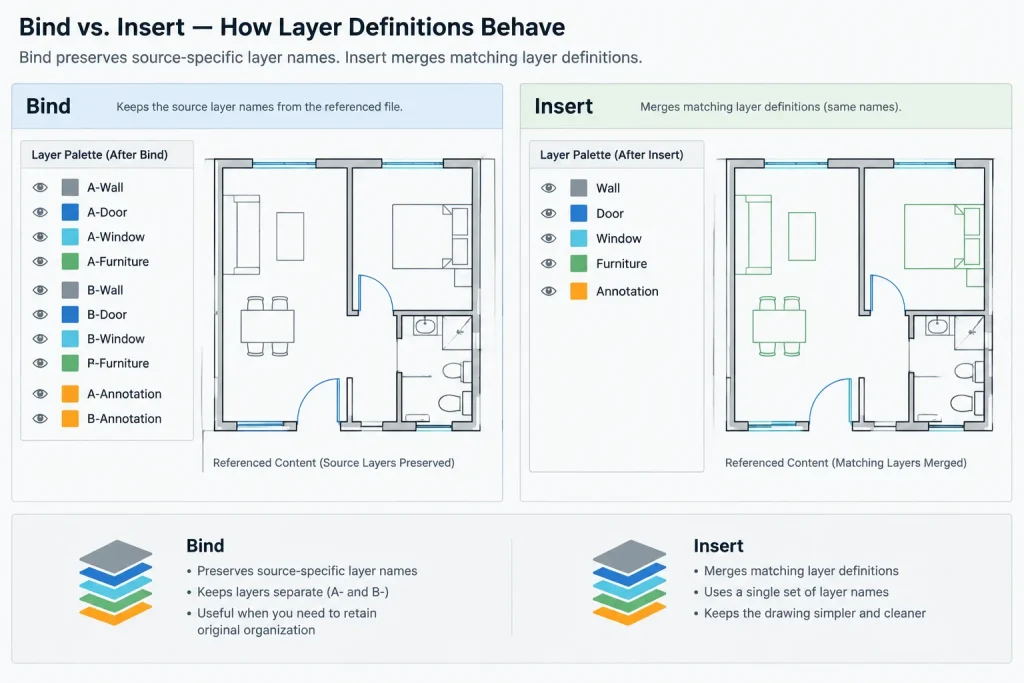
When binding an xref, AutoCAD commonly offers two methods: Bind and Insert. Both bring referenced content into the host drawing, but they handle named definitions differently.
| Method | General behavior | Typical concern |
|---|---|---|
| Bind | Preserves xref-dependent named objects as distinct definitions by adding identifying prefixes or separators to their names. | The drawing may receive long layer, style, and block names that require later review. |
| Insert | Merges referenced named objects with matching definitions already present in the host drawing. | Same-named layers, styles, or blocks may not represent the same graphic intent. |
When Bind is the safer choice
The Bind method is generally more conservative when the host and reference contain similarly named definitions that must remain distinguishable. For example, an architectural background and a consultant file may both contain a layer named for walls, but the two layers may use different colors, linetypes, or plotting behavior. Keeping the definitions separate reduces the chance of an immediate merge changing the drawing’s appearance.
The tradeoff is a larger and more complicated layer list. Bound names often retain an identifier related to the former xref, making the source recognizable but adding cleanup work.
When Insert may be appropriate
The Insert method can produce simpler names because matching definitions are merged rather than preserved as xref-dependent names. It may be suitable when the referenced drawing was created from the same controlled template and its layers, blocks, and styles are known to match the host.
Do not select Insert merely to avoid long names. If a referenced block shares a name with a different host block, or if same-named layers have different properties, merging can produce unexpected graphics. Test the result in a copy and compare it with the original plotted output.
Good reasons to bind an architectural xref
- Creating a project milestone: A self-contained copy can preserve the visible state of referenced plans at a specific issue point.
- Meeting a defined delivery requirement: A recipient may request a consolidated DWG rather than a folder of related reference files.
- Preparing a limited downstream file: A simplified background may need to be issued without exposing the active project reference structure.
- Reducing broken-path risk in a static archive: Binding selected references can remove dependency on their original locations.
A packaged set of host and reference files is often preferable when the recipient needs editable source separation. Binding should be based on the actual purpose of the deliverable, not on the assumption that one combined file is always easier to use.
A controlled workflow for binding xrefs
1. Preserve the live project files
Create a clearly named copy of the host drawing and keep the working file unchanged. If the bound file will be issued externally, place it in a separate delivery or archive location so it cannot be mistaken for the active model.
2. Review reference status
Open the External References palette and confirm that the required DWG references are found and loaded. A missing or unresolved reference cannot be trusted as part of the intended deliverable. Review whether references are attached or overlaid, and identify any nested reference relationships before proceeding.
3. Inspect the reference structure
Record which xrefs represent architectural bases, consultant backgrounds, site information, or repeated units. Check whether a reference is used more than once and whether it has been clipped, rotated, scaled, or relocated in the host.
Binding does not correct a misplaced or incorrectly scaled reference. Resolve those issues while the source relationship is still clear.
4. Choose Bind or Insert deliberately
Use Bind when preserving separate named definitions is important. Consider Insert only when matching layers, blocks, linetypes, and styles have been checked and are intended to merge. For uncertain consultant files, the more conservative method is usually easier to audit.
5. Bind references in a logical order
Complex reference trees deserve special attention. Do not assume every nested file will be incorporated exactly as expected. Overlay relationships, unloaded references, and missing files can affect what is visible or available. For a critical archive, simplify or resolve the reference hierarchy first, then verify the resulting file visually.
6. Save, reopen, and test independently
Save the bound drawing, close it, and reopen it. If practical, test it from a location that does not provide access to the original reference folders. Confirm that no required DWG dependency is still reported and that the drawing displays as intended.
Quality-control checks after binding
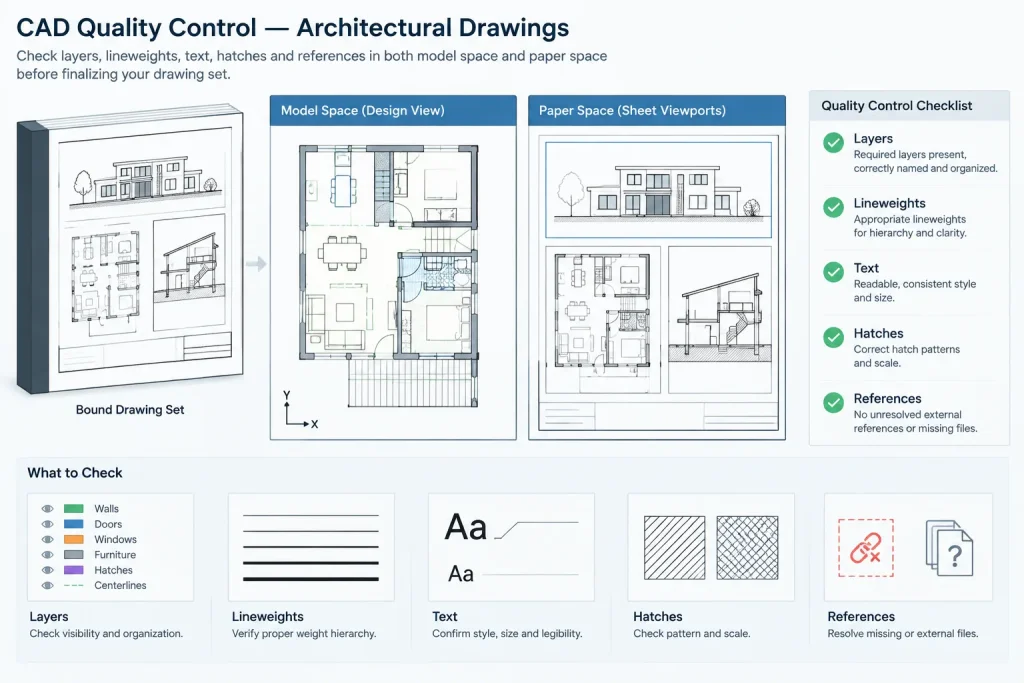
- Compare plans, elevations, sections, and details against the pre-bind drawing.
- Check layer visibility in model space and in representative paper-space viewports.
- Review lineweights, linetypes, hatches, text, dimensions, and annotation scales.
- Confirm that repeated references still appear in their intended locations.
- Inspect former xrefs as blocks and verify their insertion, rotation, and scale.
- Search for unresolved external references, including image, PDF, or other non-DWG dependencies.
- Plot or publish sample sheets using the intended page setups and plot-style resources.
- Review the layer and block lists for imported definitions that may confuse recipients.
Visual comparison is essential. A drawing can open without an error message and still have changed graphics because of merged definitions, missing support files, or viewport-specific layer conditions.
Should the bound block be exploded?
Binding converts the reference into a block, but that does not mean the block should automatically be exploded. Keeping it as a block preserves a useful boundary between the former reference and host geometry. It also makes the imported content easier to select, identify, move, or remove as a unit.
Exploding may be justified when the delivery purpose requires individually editable objects. Even then, work in a copy and review the consequences. Exploding can expose nested blocks, attributes, hatches, and other elements to further modification. Repeated exploding may also destroy useful object organization without producing a genuinely clean file.
Cleanup without damaging the deliverable
After binding, remove only content that has been confirmed unnecessary. Purging unused definitions can reduce clutter, but it should follow visual and plotting checks. Avoid broad layer renaming or aggressive standards conversion unless the deliverable specifically requires it.
If imported layers must be renamed, create a mapping plan first. A former xref prefix may look untidy, but it also records where the content came from. Removing that information too early can make later troubleshooting harder.
Common binding mistakes
- Binding the only working copy: This breaks the live update relationship and complicates future coordination.
- Using Insert without checking name conflicts: Same-named definitions may merge even when their intended graphics differ.
- Ignoring nested references: The visible result may depend on reference relationships that are not obvious from the host file alone.
- Assuming all dependencies are DWGs: Images, underlays, fonts, plot styles, and other resources may still be required.
- Exploding everything immediately: This removes organization before the bound result has been verified.
- Skipping sheet review: Model-space geometry may appear correct while viewport layers or plotted graphics have changed.
A practical delivery principle
A bound DWG should be treated as a derived deliverable, not as the automatic replacement for a coordinated xref-based project. Preserve the active source files, document why the consolidated copy was created, and verify it independently before issue.
The best method depends on what the recipient needs. If source separation and future updates matter, provide a properly packaged reference set. If a static, self-contained snapshot is required, binding can be effective—as long as Bind versus Insert is selected intentionally and the final drawing is checked like any other architectural issue file.
How to choose a binding strategy
Start with the purpose of the outgoing file. A recipient who must continue coordinating separate disciplines may benefit more from an organized package of host drawings and references. A recipient who needs a static snapshot may prefer a consolidated DWG. These are different deliverables and should not be treated as interchangeable.
Next, consider whether matching names across the host and referenced drawings represent matching content. If that relationship has not been confirmed, preserving separate definitions is easier to review than merging them immediately. A shorter layer list is not necessarily a safer or clearer result.
Document the derived file
A bound drawing should be identifiable as a derived copy. Project teams can record which host drawing was used, which references were intended for inclusion, why the file was consolidated, and whether the resulting blocks were left intact. This context helps prevent the deliverable from being mistaken for the active coordination file.
Review appearance and editability separately
Visual accuracy and editing behavior are separate quality-control concerns. First compare the bound drawing with the xref-based source in model space, layouts, and plotted output. Then inspect object organization, block structure, layer names, and remaining dependencies. A drawing may look correct while being difficult to edit, or appear well organized while plotting differently from its source.
Keep an audit trail during cleanup
Prefixes and other identifiers inherited during binding may initially make the file look untidy, but they can help reveal the source of imported definitions. Delay broad renaming, merging, purging, or exploding until the consolidated drawing has passed visual and plotting checks. Cleanup should support the stated delivery purpose without obscuring where the content originated.
Frequently asked questions about binding xrefs
Does binding an xref update it when the source DWG changes?
No. Once the referenced content has been bound into the host, it no longer maintains the same live update relationship with the original DWG. Later source revisions must be coordinated separately.
Is Bind always safer than Insert?
Bind is generally more conservative when similarly named layers, blocks, or styles need to remain distinguishable. Insert may be appropriate when matching definitions have been reviewed and are intentionally meant to merge. Neither option replaces post-bind verification.
Does binding create a completely dependency-free drawing?
Not necessarily. Binding addresses selected DWG references, but the drawing may still rely on images, underlays, fonts, plot resources, or other support files. Review all reported dependencies before delivery.
Should a bound xref block be exploded for editing?
Only when the delivery purpose requires access to individual objects. Leaving the result as a block preserves useful organization and makes the former reference easier to identify. If exploding is necessary, perform it in a copy and inspect the resulting object structure.
Why can Insert change a drawing’s appearance?
Insert can merge same-named definitions from the reference and host. If those definitions were created with different graphic intentions, the merged result may affect layers, blocks, styles, or other displayed content.
How should a bound DWG be validated?
Save and reopen the file, test it independently from the original reference folders when practical, compare it with the source drawing, review representative layouts and viewports, and check plotted output and remaining dependencies.